Forum Discussion

Links in Tasks assignments emails not working (Named environment)
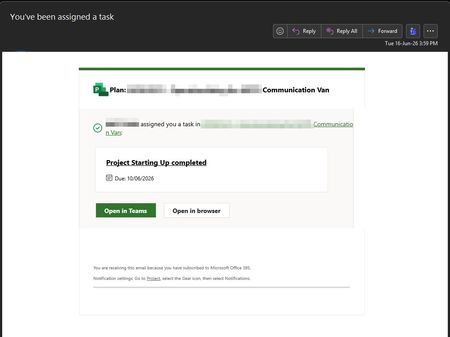

Hey, thanks for flagging this. Link issues in Planner assignment emails can be a real pain to pin down, so a couple of questions to narrow it first.
When you click the task link from the email, what actually happens? Does it 404, land on a blank page, throw a "something went wrong" message, or send you into a sign in loop that never lands? That detail really helps figure out whether it's a routing problem or an auth one.
Also worth checking: hover over the link in the email (or copy it) and look at the actual URL. In a named or sovereign environment the Planner endpoints are different from commercial, so if the email is pointing at a commercial URL like tasks.office.com or planner.cloud.microsoft instead of the correct endpoint for your environment, the link just won't resolve for your users. This came up a fair bit during the move to the new Planner, where the notification emails got updated to new URLs but the rollout timing across environments wasn't always in sync.
A quick way to confirm it's a link issue and not a data or permissions issue: have the assignee open Planner directly (through Teams or the web), find the same plan, and see if the task is there and opens fine. If it does, then the task itself is healthy and you're purely dealing with a broken deep link in the email, which narrows it down a lot.
If that's the case, I'd check the Message Center and Service Health in the admin center for any active advisory, because environment specific link problems like this are often a known issue Microsoft is already tracking. In the meantime, pointing people to open Planner directly is the cleanest workaround while it gets sorted.
If you can share what error you see and roughly what the link URL looks like (no need to post anything sensitive), happy to help dig further. Are your users on the new Planner experience, or did this start right after a migration?
 WoodyJun 17, 2026Brass Contributor
When you click the task link from the email, what actually happens?
The actual URLs for the links that fail with the above error are:
Link to the Project:https://environment.crm.dynamics.com/main.aspx?pagetype=entityrecord&etn=msdyn_project&id=5b216a24-8330-4499-8a71-e7d1cc6cc135&Type=AssignedTo&Channel=Email&CreatedTime=639171854777554160
No appid
Link to the Task:https://environment.crm.dynamics.com/main.aspx?pagetype=entityrecord&etn=msdyn_project&id=5b216a24-8330-4499-8a71-e7d1cc6cc135&extraqs=msdyn_TaskId%3d244DA0D8-1460-F111-8DBE-0022480C290D%26TabToFocus%3dPexWebTab&Type=AssignedTo&Channel=Email&CreatedTime=639171854777554160
No appid