Forum Discussion

Bucket names missing in "My Tasks" View
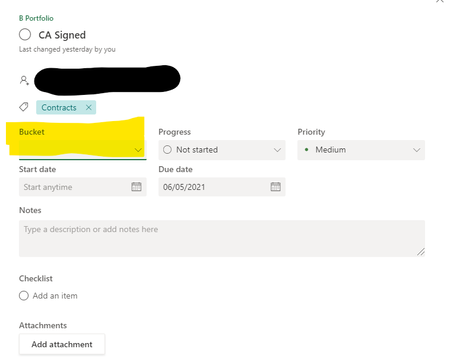

jcgonzalezmartin Yes, but the Bucket name should appear when you click a task in this view. The bucket name would normally appear in the field highlighted in yellow in my screenshot, but for some reason all the bucket names have disappeared from the task cards when in "My Tasks" view.

- cahroleenMay 20, 2021Copper Contributor
SanthoshB1 I've cleared the browser cache and cookies multiple times.
This issue occurs when I click the "My Tasks" section of Planner. See screenshot:
When I click any of the individual tasks to open them, the Bucket field is empty. For example, see the Late task in the screenshot above. When I click on it:
See how the Bucket field is empty? This is the case for ALL the tasks: the Bucket Names are not pulling through in the "My Tasks" view.
Please help! Or let me know if there is another MS Planner help site I can send this to.
- SanthoshB1May 20, 2021Bronze ContributorYou can try creating a support ticket.
- cahroleenMay 21, 2021Copper Contributor
How do I do this? Could you please share a link? Thanks!