Forum Discussion

Re: Windows Server 2022 RDS CALs missing in partner benefits

LicensingConcierge1 You can also read about the Software Benefits here. Of Course, this is a generic page, so it does not list the specific products/licenses.
https://learn.microsoft.com/en-us/partner-center/mpn-benefits-software

Thank you for providing the link that you've referenced.
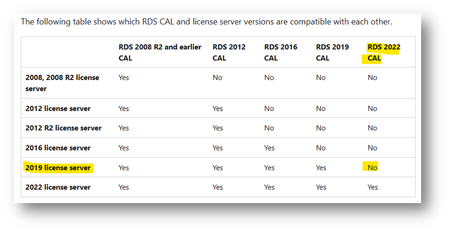
Please click on the highlighted hyperlink in the screenshot above for "next steps" and follow the steps for product support and/or advisory hours to discuss why the guide says that Windows Server Remote Desktop Services (RDS) CALs is not edition-specific; you've stated that Partner Support pointed out that the CALs included in the benefits are indeed Windows Server 2019 Remote Desktop Services CALs; and that the RDS CALs are listed as 2019, while the Server licenses and the ordinary CALs are for 2022.
Manage Microsoft AI Cloud Partner Program benefits - Partner Center | Microsoft Learn
If this reply answers your question, please Accept as the solution to help the other members find it more quickly. Otherwise, please let me know if you need further assistance on this topic.
Regards,
Microsoft CSP Licensing Concierge
Regards,
Microsoft CSP Licensing Concierge
- LicensingConcierge1Sep 14, 2023Former Employee
Since this conversation was overshadowing the original post and you've indicated that you have either designation or an action pack, I've created a new post on your behalf and moved this conversation back to Partner Benefits.
Regards,
Microsoft CSP Licensing Concierge
- stevnhovedSep 14, 2023Copper Contributor
LicensingConcierge1 Sorry, but this is really like going uphill.
The Benefits Guide I referred to (https://aka.ms/solutionsPartner.benefits) is a 29-page guide of all the Benefits. "Windows Server Remote Desktop Services (RDS) CALs (not edition-specific)" is listed 7 times. That is under each of the six Solutions Partner designations (Business Applications, Data & AI, Digital & App Innovation, Infrastructure, Modern Work, Security, Apps & Infrastructure), and then the Action Pack.
In my case we get the Benefits from the Business Applications designation. I can't believe that it should makes any different, which designation you get the Software Benefits from.