Forum Discussion

Remove unnecessary "All Apps" button
- Sep 07, 2023
Hi JayAtNFT
I am an independent advisor responding to Outlook questions.
Unfortunately, you can not have both. You can not remove the All Apps icon from the left navigation.
Please provide MS with the feedback.
Please remove the best response status from your previous message.
/Teresa
#traccreations4e

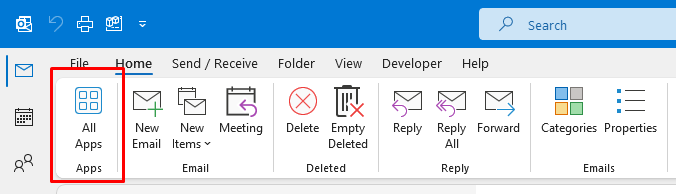


msdos3 Right? This button just appeared out of nowhere. When I click on it, Outlook tells me "You don't have any apps yet. Select Add Apps to browse and install apps." Unfortunately there is no button anywhere that I can find to Add Apps. Thanks for nothing Microsoft!
Now after visiting this forum I went back into my Outlook screen and the All Apps button seems to have disappeared! WTF!!! Oh, no it hasn't. It's now appearing at the far right just before the Send/Receive button. I can live with the useless button there, but why is it here at all? It was a royal pain having it in between my Reply/Reply All/Forward button and the Move to Folder button. But now I'm wondering if the dang thing is going to keep moving around on the ribbon randomly. What's going on, Microsoft? How did the button move on its own without me making any changes to my settings?
Ah, wait! It's just on the far right when I'm in my email items listing. When I go into the individual message, it's back between my two most used buttons! Thanks too Microsoft for making everything so inconsistent!