Forum Discussion

Problems with Quick Steps in Outlook New
 Dec 12, 2024
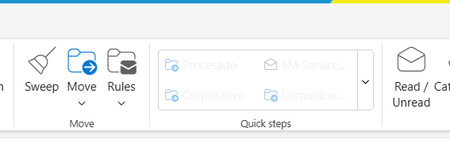
If a quick step has an Action in it that cannot be applied to the currently selected email, it will be greyed out in the Ribbon. For example, if a quick step Unpins an email, it will be greyed out unless the current email is Pinned.

In Classic Outlook, the first email is automatically selected, allowing Quick Steps commands to be readily available. However, in New Outlook, you need to manually select an email before the Quick Steps commands become accessible. This difference in functionality may explain why it seems random at times.
If you find this information helpful, please mark it as the best solution, which will assist others with the same question.
/traccreations4e 12/3/2024
 DanitroDec 05, 2024Copper Contributor
Tnks Teresa, however don´t work... I select an email before the quick steps commands but ...
it´s rare