Forum Discussion

Outlook unable to find Profile after closing the programme
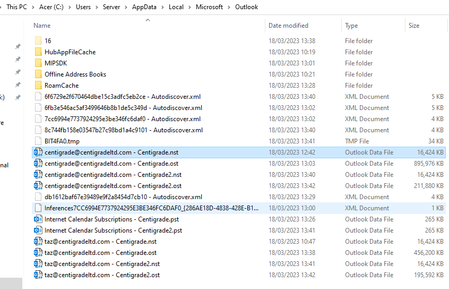

I then have to create a new profile via open as an administrator.
That is a big red flag right there. It is most likely also the reason why your Mail Profile directly corrupts again. Why do you deem this needed in the first place and what happens when you try to create your Mail Profile normally?
Recreate your Mail Profile via the Mail applet in Control Panel and try again.
See: Adding/Recreating a Mail Profile - HowTo-Outlook
Also, if there are any 64-bit add-ins still installed, it is recommended to remove them when you are using a 32-bit version of Office. Although they should be ignored, unfortunately some devs of 3rd party apps do all sorts of crazy things to make their add-ins "resilient" 😉
 CentigradeMar 21, 2023Copper Contributor
Thank you for the help.
I click on the outlook icon and then it will error. If I click on it again it doesn't responded or if it does it goes into some sort of safe mode and sets up a new profile without my information in it.
I have to right click and open as administrator to get to the profile selection.
I have uninstalled the 64bit via add remove. I never actually used any of the apps as I soon realised I couldn't use our access database with the 64 bit version. Could it be a registry issue also?
Il try adding from where you suggested