Forum Discussion

VineeshKV88
Dec 25, 2021Tin Contributor
Outlook Search not showing Recent Emails (December-2021)
Hi All, The outlook search option stopped working properly after WIndows10 update. The issue has happened after installing a security update from Windows (December 14, 2021—KB5008212). I had...

mingerz
Jan 11, 2022Copper Contributor
Hello everyone
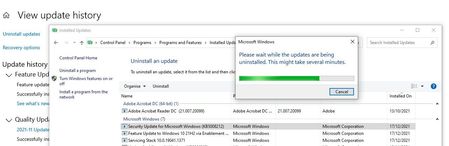
I've already tried rebuild index, I've tried the method of adding the key in REGEDIT, I've reinstalled outlook, I've updated windows, but all options work for a few hours and most of the time when the pc restarts the problem comes back and outlook doesn't find recent emails. and I can't uninstall this KB5008212 update either, I've tried using cmd, I've tried in safe mode, anyway, I don't know what else to do...
I've already tried rebuild index, I've tried the method of adding the key in REGEDIT, I've reinstalled outlook, I've updated windows, but all options work for a few hours and most of the time when the pc restarts the problem comes back and outlook doesn't find recent emails. and I can't uninstall this KB5008212 update either, I've tried using cmd, I've tried in safe mode, anyway, I don't know what else to do...

Gabe_Bratton Microsoft
Jan 11, 2022Microsoft
Make sure you are setting the regkey in the correct path. Once you create the regkey restart Outlook to pick up the change.
You will know its working when you see the policy notification right above the search results that says: "Search performance will be impacted because a group policy has turned off the Windows Search service."
Another option. Put this text below in Notepad and save as preventindexingoutlook.reg. Then double click on it and install the regkey.
Windows Registry Editor Version 5.00
[HKEY_LOCAL_MACHINE\SOFTWARE\Policies\Microsoft\Windows\Windows Search]
"PreventIndexingOutlook"=dword:00000001