Forum Discussion

Outlook for Android search issue
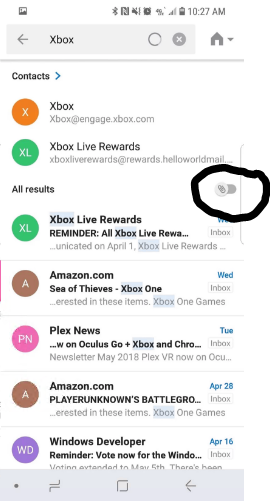


I don't have a 'house' Icon I have 'All', 'Email', 'People', 'Files', 'Events' and they all return 'No Results' Suzanne1495

This is the drop down where you select what email account to search. Not sure why Outlook keeps changing to the one email account that I rarely use. Thanks again Suzanne for pointing this out!
 PJWallsJul 04, 2023Copper Contributor
 PaultheportoscomJul 25, 2023Copper Contributor
PJWalls Solved! THIS IS AN APP BUG.
I had this problem for 2 years, Android Outlook Search never found anything (though it used to work, and reinstall did not help). Search worked fine on my wife's Galaxy S22, but not mine, so I compared them. Same app version, but hers had the Home icon in the upper right of the screen after tapping the Search icon (as discussed above in this thread) MINE DID NOT.
We both use an IMAP mail server as our primary mail account, but I noted she had also added her Yahoo mail account into her Outlook. It seems the Home icon is only there if you have multiple accounts. I added my Yahoo mail account, then saw the Home icon, accessed the drop down, chose ALL, and now search works fine, including searching in my IMAP mail.
 Peter_KrajnyJul 26, 2023Copper ContributorYes, I wrote about this earlier, that must be installed min. two account. But I don't want to install some unreal account. I use only one account many years and many years worked search function well. Stoped to work - I don't know when. I try to use other free e-mail client. Seems works well, so I plan to switch. This function is necessary, I don't want to solve it for years. MS ignore it. So I switch.