Forum Discussion

Outlook Email view graphics problem
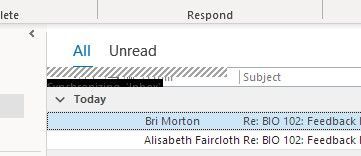

I'm seeing the same issue on Outlook 2021 (standalone), Dell G5 SE, Windows 10. Wouldn't it be nice if someone from Microsoft responded? I only see it when I'm in my Inbox folder, and it does go away if you move to a different folder. I think it's related to the Send/Receive action, those graphics usually appear on the bottom information bar during send/receive actions. Hope we hear something soon, it's very irritating.
 DeeGee1313Jun 21, 2022Copper Contributor
Same issue here. Dell Precision Windows 10 64bit with 21H2 update, Nvidia and Intel onboard graphics, Office365 64bit, all plugins switched off/uninstalled. Mail syncing to Office365 mailbox, in cached mode. No matter what graphics board I install, or using onboard graphics, the black boxes in Outlook return. Wiped hard drive, installed Windows 10 64bit again and Office365 64bit, and problem returned. I switched off extra animations, as well as loading previews and other options in trust center, and problem still remains.