Forum Discussion

OFFICE 2026

Does the "this product will not be updated just refer to 365 and not my 2024.
It refers to Office 2024 as that is currently installed and activated.
It is not trying to sell you anything, but it is notifying you that you have turned off automatic updates.
File-> Account-> Update Options-> Enable Updates
Still trying to make sense of the new OUTLOOK!
Classic Outlook is included with your Home and Business licence as well. You can run Classic Outlook and New Outlook side-by-side to get used to New Outlook and/or wait until any of your favorite missing features becomes available before you switch. There is no rush as Classic Outlook remains supported for at least the length of Office 2024 support (which ends in October 2029).
See: How to install and run the New Outlook and Classic Outlook side by side - Robert 365
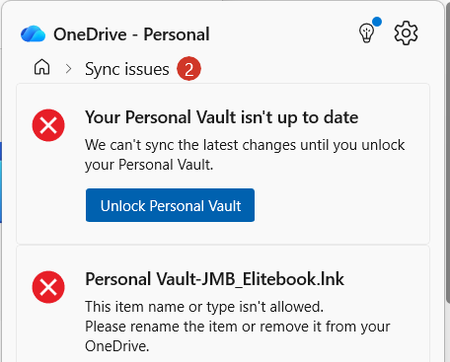
Also One Drive - it has installed a folder with my initials and does not seem happy about it but I cannot rename it?
The sync issues don't refer to the folder with your initials (which is your user folder based on your username) but indicates that you need to unlock Personal Vault (an additionally secured folder within OneDrive) before you can sync its contents. Click on the button to unlock.
The other sync error refers to an old shortcut to Personal Vault which you should remove.