Forum Discussion

Enclosure4764
May 16, 2023Copper Contributor
No Flag option in OWA rules
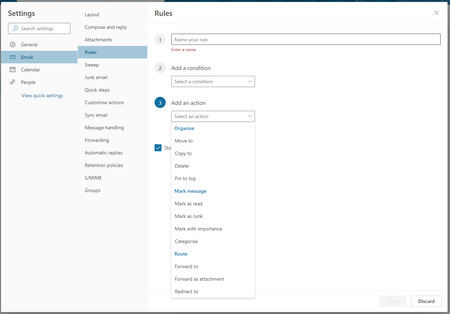
When I go to set up a rule in outlook web (OWA), there is no option to select 'flag email' action. This is available in the desktop version. I'm using corporate managed Office 365. Is it just not an ...
 May 16, 2023Creating a flag with a rule is NOT supported in OWA or new Outlook. You can Bing/Google and confirm.

Victor_Ivanidze
May 16, 2023Bronze Contributor
Hi NikolinoDE,
don't be offended but your answer is too general.
Could you please tell me if there exists OWA that supports emails flagging?
If yes - which Office 365 version provides this functionality?
jbucarion
May 16, 2023Brass Contributor
Creating a flag with a rule is NOT supported in OWA or new Outlook. You can Bing/Google and confirm.
 mikehoopesSep 13, 2023Copper ContributorIt's disingenuous to suggest that it's an organization option when nobody in my Google searches has been able to do this. Just say it's not supported, and then we'll lean on MS through product feedback to get it implemented. OWA has a "Flagged" filter option, so it's not like the Flag has been deprecated for the web, unlike the Journal.
It's obvious that MS wants us to transition from these Windows clients to the web/apps - but it's difficult to do so when our workflows revolve around things that aren't in the web clients or Windows Store apps. Enclosure4764May 17, 2023Copper ContributorThanks for everyone's response here. I appreciate the communities support in confirming this. At least I know to try alternative methods (currently I'm using power automate). I really could not find anything when searching, which is why I posted here. Maybe I just didn't search correctly.
- NikolinoDEMay 16, 2023Platinum Contributor
You are right, there is no way in Outlook Web.
My mistake in reasoning, thanks for the clarification, helped.
As you said, when setting up a rule in Outlook Web (OWA), there is no option to select the "Flag email" action.
As far as I could research, however, as a workaround, one could flag emails for follow-up in OWA by sending the message, then opening the Sent Items folder and using the "Flag Quick Actions" button, or right-clicking and "Flag" from the context menu.
- Victor_IvanidzeMay 17, 2023Bronze ContributorIt's not a workaround - you just told us a user can flag manually.
- NikolinoDEMay 17, 2023Platinum ContributorCall it what you like, it's just an alternative approach.
