Forum Discussion

Margie4graphs
Jan 15, 2025Copper Contributor
Junk Email list problem in Windows 11
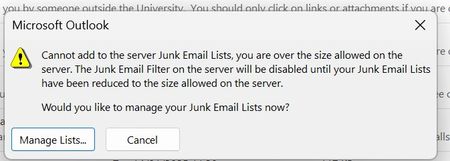
Hello I am attaching a screenshot of a warning message I have newly received when seeking to relegate SPAM to the junk category when using Outlook on Windows 11. Regarding message counts, these ar...

kyazaferr
Jan 16, 2025MCT
Understanding the Issue:
- "Blocked Senders" and "Safe Senders" Lists: These are two different lists used by Outlook to determine whether an email is considered spam or safe. It seems that the number of blocked senders and safe senders is quite large, which may be causing performance issues.
- Outlook Web vs. Desktop: The "Block Sender" option in the web version of Outlook moves emails to the Deleted Items folder, which is different from the Desktop version where messages are moved to the Junk E-mail folder.
2. Resolve the "Junk E-mail" Folder Behavior:
First, let's make sure that your Junk E-mail folder is properly set up in Outlook Desktop:
- Check Junk E-mail Settings:
- In Outlook, go to Home > Junk > Junk E-mail Options.
- Ensure that the correct filtering level is selected. If it's set to "No Automatic Filtering," the manual "Junk" option may not work correctly.
- Select Low, High, or Safe Lists Only depending on your preference.
- Click Apply and then OK to save changes.
- Junk E-mail Folder Location:
- Ensure that the Junk E-mail folder is in your primary account's folder list. If it's missing or misplaced, try rebuilding your folder list:
- Close Outlook.
- Open Control Panel > Mail > Email Accounts.
- Choose your account and select Repair.
- Ensure that the Junk E-mail folder is in your primary account's folder list. If it's missing or misplaced, try rebuilding your folder list:
3. Addressing the Blocked Senders and Safe Senders Lists:
It seems like the large number of blocked/safe senders may be causing issues:
- Clear the Lists: If you have many entries in these lists, consider cleaning them up to reduce potential conflicts.
- Open Outlook.
- Go to Home > Junk > Junk E-mail Options > Blocked Senders or Safe Senders.
- You can manually remove entries that are no longer relevant.
- Import/Export Blocked and Safe Senders: If you need to export or back up your current lists, you can use PowerShell to do so:

Margie4graphs
Jan 20, 2025Copper Contributor
Thanks for these suggestions. In the final analysis, what is needed is an increase in the capacity for the number of such messages using MS Windows. As a short-term solution, I deleted my Safe Sender list to release some capacity. I agree with the filtering idea and have implemented it, while realising that this will not reduce my existing Blocked Sender list.