Forum Discussion

Margie4graphs
Jan 15, 2025Copper Contributor
Junk Email list problem in Windows 11
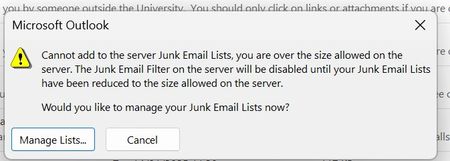
Hello I am attaching a screenshot of a warning message I have newly received when seeking to relegate SPAM to the junk category when using Outlook on Windows 11. Regarding message counts, these ar...

kyazaferr
Jan 16, 2025MCT
Get-Content -Path "C:\Users\YourUser\AppData\Local\Microsoft\Outlook\JunkSenders.txt" > C:\backup\junk_senders.txt
Sync Issues Between Outlook Desktop and Web:
The difference in behavior between the desktop and web versions of Outlook regarding the "Block Sender" feature is likely due to differences in how the two platforms handle junk email.
- Web Version Settings: The web version may treat blocked emails differently. If the desktop version sends messages to Junk E-mail while the web version moves them to Deleted Items, ensure your settings on the web are aligned with the desktop version:
- In the Outlook web app, go to Settings (gear icon) > View all Outlook settings > Junk email.
- Set the desired level of junk email filtering.
5. Other Recommendations:
- Check for Updates: Ensure both Outlook and Windows 11 are fully updated, as updates often fix known issues.
- Go to File > Office Account > Update Options > Update Now in Outlook.
- For Windows updates, go to Settings > Update & Security > Windows Update > Check for updates.