Forum Discussion

TarasNehrov
Jul 06, 2023Copper Contributor
How to hide file extensions in outlook
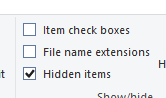
Hi there. I need to hide somehow file extension not only in File Explorer, but in Outlook also. When composing new email I insert attachment via Attach File. In this window file extensions are hi...

Victor_Ivanidze
Jul 07, 2023Bronze Contributor
Sorry I don't catch your point.
in my environments it looks like FileName.originalExtension.lfs.
In customer env it is past like FileName.originalExtension. .lfs is hidden/not shown, and our add-in processes it as pdf file
But the original extension is pdf, correct? Why abscence of .lfs extension prevents you to do what you want?

TarasNehrov
Jul 07, 2023Copper Contributor
.lfs is not supported file extension. We do not process it.
.pdf is listed as supported extension. We process it. So the problem is - LFS functionality of Mimecast replaces the original file with the link - and in case when display_name or full_file_name do not includes .lsf extension - we corrupt this link.
We`ve already tried to replace display_name with full_file_name - and it works for most of the scenarios when any 3rd party add-ins interact with email attachments before ours.
But in case with Mimecast it doesn`t work. It looks like they do not change file_name when adding their link.
.pdf is listed as supported extension. We process it. So the problem is - LFS functionality of Mimecast replaces the original file with the link - and in case when display_name or full_file_name do not includes .lsf extension - we corrupt this link.
We`ve already tried to replace display_name with full_file_name - and it works for most of the scenarios when any 3rd party add-ins interact with email attachments before ours.
But in case with Mimecast it doesn`t work. It looks like they do not change file_name when adding their link.
- Victor_IvanidzeJul 07, 2023Bronze ContributorCould you show what exactly you can retrieve at the recipient's end (display_name, full_file_name etc)?