Forum Discussion

How contacts are supposed to work in the Outlook web app
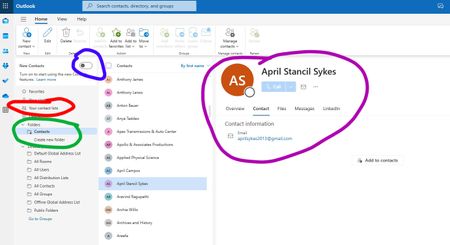

Add to contacts is shown when the contact is not in your contacts folder - usually from the recipient cache AKA autocomplete list (or if you previously used Outlook customer manager - the custom list still exists hidden in the mailbox). I also see it on some contacts moved into that mailbox from a different account or that I added on my cell phone but it's possible they are in the autocomplete list and is showing that entry.
Outlook on the web hides duplicates, so you might only see 1 - the autocomplete entry.
New Outlook app and classic Outlook only show the contacts in the folder.
FWIW, you'll see similar weirdness in classic Outlook when you Search people. If the entry has Add to contacts, it's from the autocomplete cache.
Contact lists is for contact groups / DLs. The web separates them from contacts.

I'm having the same issue. On the outlook.com website, in the Folders/Contacts folder I see all of my contacts but only a few are complete and the rest are minimal and have an add contacts button.
In the Your contacts folder (tab?) I see only the contacts that are complete. The ones that have the add contacts button in the other folder don't show up here at all.
In the Windows classic Outlook app, all the contacts, with complere information, show up in the main contacts folder.
So what's the procedure to get all the contacts from the app into the online version and have them all sync correctly. On my computers I use the Outlook app so I rarely use the website, but it's a real issue as I'm not getting the contacts syncing correctly to my phone.
If anyone has solved this, please post here.
Thanks!