Forum Discussion

How contacts are supposed to work in the Outlook web app
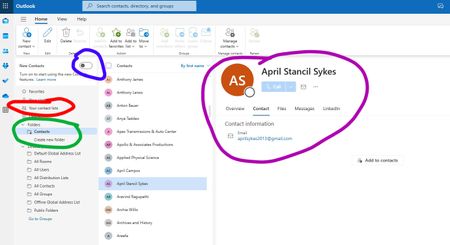

I have exactly the same issue. I am finishing up a job where I have been for 16 years and have a lot of contacts (3500+) with detailed notes that I need to keep. My old work email is D365 Outlook and my personal email is a Hotmail address. I have a D365 Family annual subscription. I exported all contacts from work D365 account to a .PST file and then imported the .PST into desktop version of old Outlook on PC logged into the Hotmail account. When using old outlook on the desktop I can see all contacts and all of the detailed notes. When I use "new" outlook on web or "switch to new outlook" on desktop or look at contacts on Outlook App on phone (Android Samsung S23) then in all cases using new outlook most contacts show "add contact" as if they are new contacts not yet saved. Also there is very little data and no notes in each contact and the only way to see it is to click "edit" on taskbar. If this issue was raised elsewhere can yoy point me to where? Thanks

using new outlook most contacts show "add contact" as if they are new contacts not yet saved.
That usually means the item you are looking at is an autocomplete entry, not the real contact.
If you have the new contacts switch at the top, turn it off and look in Folders- or in classic Outlook, select all the contacts and assign a category to them. Then view them in the Category list.