Forum Discussion

"Format picture" has disappeared from Outlook Mac
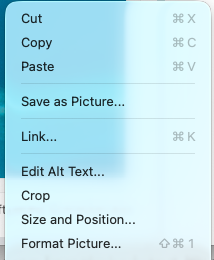

So, I think i finally found a way to get back the format picture option as well as many other things which were gone with the new outlook for Mac. The process is disabling the 'Connected Experiences' (as microsoft calls them). Here is the process:
- from Outlook, go to Outlook->Settings->Privacy
- Uncheck the 'Turn on optional connected experiences
- Restart outlook
- Then go to help->Clear Application Data
- Select 'Experimental Features' and 'Identities' (first and third options in my case)
- Click on Clear button (outlook will restart)
- Open Outlook again, and sign in to your account
- Restart outlook (important, dont skip this step)
- You should now have the old outlook Format Picture option
- mjt0077Feb 06, 2026Tin Contributor
Thank you soooooooo much for this... I've been creating work-arounds for the last couple of months that have been doing my head in!
You are a Superstar!!! 😁
 au16385Feb 05, 2026Copper Contributor
Thank you so much! Your recipe worked 100% What a relief.
'Connected Experiences' are apparently 'Experimental Features'... Well, Microsoft — if I have to choose between being in on the latest "features" and doing my work, I prefer the latter.
 tvdangJan 27, 2026Copper Contributor
This fix works perfect for me too. Remember to go through all the steps! Especially step 8.
 thedannyjaneJan 08, 2026Copper Contributor
You are my hero!
 lehallDec 09, 2025Copper Contributor
I am so happy this worked!!! Format picture has returned! Thank you!