Forum Discussion

CreateObject getVersion Outlook registry key
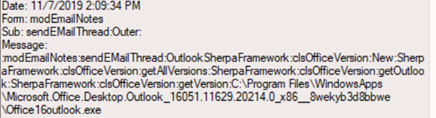
 Dec 13, 2019Got it.
Big thanks to Diane on the community site. Key referenced
HKEY_LOCAL_MACHINE\SOFTWARE\Microsoft\Windows\CurrentVersion\App Paths\outlook.exe
If I alter the path, the automation breaks and causes the errors in the Event Viewer. Users affected likely still have a path tied to the store app version of Outlook, even if it was previously removed off the system, the registry did not get changed to reflect a pathway to the C2R local version of Outlook. Correct the values to the following and the problem is resolved:
(Default) C:\Program Files\Microsoft Office\Root\Office 16\OUTLOOK.EXE
Path C:\Program Files\Microsoft Office\Root\Office 16\
I've posted a similar entry on social.technet and on the community site.
To simplify -
My immediate question is when the CreateObject command is used that has a getVersion to check the registry for info on the currently installed version of Outlook - which should lead to a value on the registry key that has a file path -
I need to know the exact registry key the getVersion part actually checks. Everything else is irrelevant until I know the specific key being used to get to Outlook.
People seem to know how to get from A to Z, but not the in-between in this case. I've got half a dozen people experiencing the same problem at the moment - if I knew which key is being used I could easily replicate the problem on my own device.
So far the game plan is to export the entire registry, look for keys with a particular file path and change them until I discover by trial/error which key breaks the process since it doesn't appear to be documented anywhere I've looked online.
Is it in CLSID? Interface? TypeLib? Even in Classes_root? Actually in Local_machine?
Big thanks to Diane on the community site. Key referenced
HKEY_LOCAL_MACHINE\SOFTWARE\Microsoft\Windows\CurrentVersion\App Paths\outlook.exe
If I alter the path, the automation breaks and causes the errors in the Event Viewer. Users affected likely still have a path tied to the store app version of Outlook, even if it was previously removed off the system, the registry did not get changed to reflect a pathway to the C2R local version of Outlook. Correct the values to the following and the problem is resolved:
(Default) C:\Program Files\Microsoft Office\Root\Office 16\OUTLOOK.EXE
Path C:\Program Files\Microsoft Office\Root\Office 16\