Forum Discussion

Copilot in new Outlook doesnt copy full text
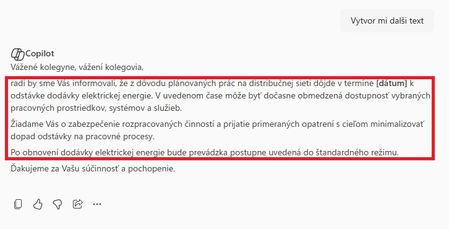

The screenshots show that Copilot generated a greeting, body, and closing, but Copy placed only the body on the clipboard. Microsoft’s Outlook guidance does not promise that the Copilot Chat copy icon includes every part of a response, so this looks like a client behavior or defect rather than a permission setting.
In new Outlook, start New mail, choose Copilot > Draft, enter the request, and select Keep it when the result is ready. This inserts the draft into the message editor, where you can confirm the greeting and closing before sending. If you prefer Chat, ask it to include both inside the message body, then paste and verify the result.
If Copy still omits those lines after restarting and updating Outlook, open Help > Feedback, attach the screenshots, allow diagnostics if offered, and include the Outlook version. Microsoft does not document a separate option that changes this clipboard behavior.