Forum Discussion

Conversational View in Outlook for Windows
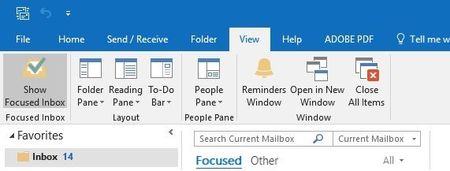

There was an issue with builds 9001 and 9011 in which one could not switch back to Classic view from Conversation view that has been corrected in later builds. This is the first report I've seen for 9029. I'm on Insider Fast, build 1804 (9213.2031) and no longer have the issue, which I did when I had 9011. There appears to be a later build available, 1802 (Build 9029.2167), you might try updating to it. There is a work-around you can try - once you click available (Classic) view mode and restart Outlook, change is applied to messages.

Thanks, Hal! I'm on the latest build of this channel - when I check for updates, it tells me that there are no updates available. I'm glad to hear that it appears to be fixed in the new Insider build, so I can wait for that.
I'm not sure what you mean by the workaround - I don't see the word Classic anywhere anymore. Even when I search "Tell me what you want to do" for Classic, the Views appear, but classic isn't an option available:
Again, thanks for the reply, and I'll keep my eye out for it once the Insider build moves to the Monthly channel.
- Mar 26, 2018
What I meant by that is that in 9001 and 9011, the Classic button was available to click, but did nothing, it wouldn't return one to Classic view. The work-around was to click Classic, then close and restart Outlook which DID return one to the Classic view. If you have no button to click, that would suggest it might be missing from the Ribbon settings. For that, I would bring up the "Customize the Ribbon" dialogue, drill down through View and Mode to see if both Classic and Conversational are listed.
- Peter FarrellMar 29, 2018Tin Contributor
Thanks for the suggestion - I customized the ribbon and found both buttons, but when I add them to my ribbon, they're both greyed out. I'm really not sure what's going on - the same behavior is happening on all 3 of my computers, but I can't find anyone else who's having the same trouble.
- Mar 31, 2018
Your screen shot shows the two buttons in a "New Group", in my installation, they appear in the Mode group. Here's what my Customize Ribbon screen looks like:
What version and build (File > Office Account) do you have?