Forum Discussion

Confusing, extra "cursor", in Outlook Calendar Appointment body
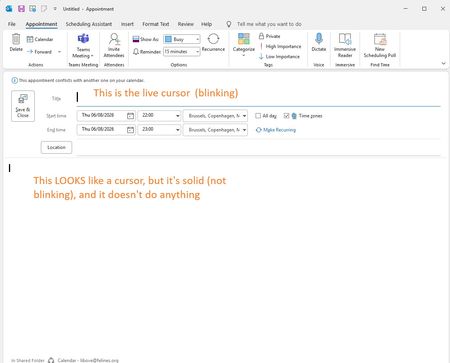

The screenshot confirms that the solid mark is a stale caret drawn in the appointment body while keyboard focus and the blinking caret remain in the Title field. Since you increased the Windows text-cursor size, first open Settings > Accessibility > Text cursor, set thickness back to 1, turn the cursor indicator off, sign out, and test again. If the mark remains, start classic Outlook with outlook /safe. A clean display in Safe Mode identifies an add-in or customization; disable COM add-ins individually. If Safe Mode shows the same mark, update Microsoft 365 and run an Online Repair, then test at 100% display scaling. Because it occurs on multiple machines, preserve the screenshot and submit feedback from Outlook with the exact Office build, Windows build, scaling, and cursor settings. Outlook has no documented option for hiding an inactive editor caret, so avoid registry modifications or unsupported rendering flags.