Forum Discussion

Something Went Wrong - OneDrive Sharing file and folder
- Jun 02, 2020
Hi Suraj_Sukumaran,
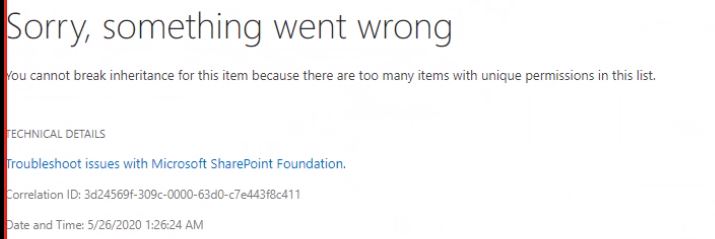
Based on the screenshots you provided, this looks to be an issue that occurs when you have too many items with unique permissions in the same site. You can read more about the limits here.
Generally we recommend either moving content into separate site collections to reduce the number of unique permissions or look for other ways to group files together (say, in a single folder that is shared) instead of sharing the files individually.
Hope that helps!
Stephen RiceSenior Program Manager, OneDrive


Found a solution (and maybe we need a GPO to control it).
Go to "internet properties", "Advanced", "Security" and uncheck "Do not save encrypted pages to disk" and click "Apply".
After this change we are able to share a OneDrive file in Windows Explorer.
-Frank.

I am having a related problem. I've been able to share OneDrive files for 1-2 years (at least). Today, OneDrive refuses to share any file. I am using an iMac so the Internet Properties solution won't work. I've attached a screen shot of the error pop-up I am getting.
Any help appreciated.
- Aug 28, 2020Is it the same from all clients? (desktop client / Online / mobile app)
Anyone else in your organization that have this issue as well?
Adam- NBIrkettAug 28, 2020Copper Contributor
I've tried sharing from the OneDrive file in the MacOS file system and from the online OneDrive Web page. I don't know if anyone else is having trouble.
I have a personal Microsoft 365 subscription which is what I was trying to share from (that account is what shows up when I check the account information on the web page). My university has a corporate subscription but I couldn't use that to log-in to (claimed the account didn't exist.
Just tried again to share and got a different error - unable to reach the server
- NBIrkettSep 01, 2020Copper Contributor
An update. I exchanged several emails with a Microsoft tech support person over two days. Then, the sharing started working again. I didn't change anything. And, I have received no explanation from Microsoft about what the problem was nor what was done to fix it. Based on it being fixed without changing things at my end, I am assuming that there was an issue with a Microsoft server. But, I can't say for certain.
- StephenRiceAug 28, 2020
Microsoft
Hi NBIrkett,
That definitely looks concerning! Does this happen on every share or was it a one time thing?
Stephen RiceSenior Program Manager, OneDrive
- NBIrkettAug 28, 2020Copper Contributor
I get the same error for every file I try to share, including files that I shared in the past.
- StephenRiceAug 28, 2020