Forum Discussion

PKlapwijk
Jan 24, 2017MVP
OneDrive for Business SharePoint Library link missing form File Explorer
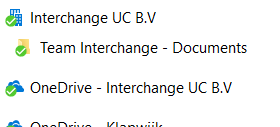
My customer is running OneDrive client 17.3.6743.1212 (latest version) and synced a few SharePoint libraries (SP Online/ Office 365). Last week his password expires, so changed his password, entere...

PKlapwijk
Jan 24, 2017MVP
The one with the little building icon is missing. Strange behavior. It`s not just a shortcut under Quick Access, unfortunately. So have no idea to get it back, probably by stop the sync and start the sync again, but it takes hours to sync the files again.

SergeiBaklan
Jan 24, 2017Diamond Contributor
One more way you may try to follow this instruction http://www.windowscentral.com/how-remove-onedrive-file-explorer-windows-10, but not literally - find the key by the name of tenant. In my case it looks like
- PKlapwijkJan 25, 2017MVP
SergeiBaklanThanks for that, already searched the registry for this key, but for the SPO library it is not there anymore.
- SergeiBaklanJan 25, 2017Diamond Contributor
Peter, try to search not by registry key, but by your tenant name. It shall be two entries under CLSDI like
"OneDrive - <tenantName>" for OneDrive
"<tenantName>" for SPO
I believe it shall be the record in the registry if your ODFB client works and you have synced folder under the user profile.
- PKlapwijkJan 25, 2017MVPSergei,
Also tried that, searching the registry on the tenant name. It looks like it is completely gone.
Have not received a response from my customer to do a remote session and add a test library to see if the link returns.