Forum Discussion

One Drive Context Menu Share Button Missing!
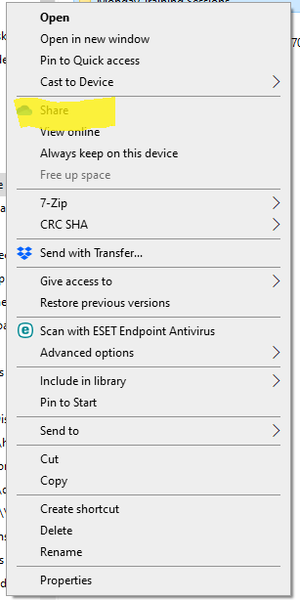

I have the same problem in Windows 11. I tried every single solution I found in internet (except to delete the user and recreate it again) and nothing helped. It's just the buggy Microsoft software... At least I came to a workaround - I noticed that if I open the location of the OneDrive.lnk file and right-click on it some magic happens and the OneDrive context menu starts working. So I copied OneDrive.lnk to the root of my OneDrive folder, now when I right click it the functionality comes back.
Microsoft, it's a shame - your own cloud service doesn't work correctly on your own OS!

 MAS-PLKFeb 24, 2022Copper Contributor
- alexanderhunter1490Feb 24, 2022Copper ContributorNo, sorry. The threading here doesn’t work like I was expecting. UAC had no impact for me whatsoever. But copying a OneDrive.lnk in the main folder miraculous worked. Very odd behavior. I had this issue for many weeks now and so far, this workaround shows good results.
 walke1925Oct 06, 2022Copper Contributor
Wow. The OneDrive "Share" menu item broke on all 45 of my workstations with no warning and no solution, until I found this. I have no idea WTF is going on here or how you figured it out but I really, REALLY appreciate you posting this. It is indeed the only thing that fixed it for us.
However, deleting the OneDrive link out of the folder removes the Share item and so far I've not been able to get it to come back again. So if you do use this solution to fix it, just leave it alone once it's working again.