Forum Discussion

Ian Moran
Nov 21, 2017Steel Contributor
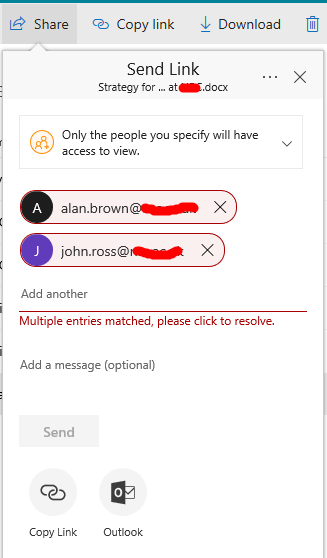
Multiple entries matched, please click to resolve
Seeing the following when attempting to share from ODFB - clicking to resolve as suggested does nothing. These users exist in another tenant that I am also a member of. They are not defined in my own...
 DeletedNov 21, 2017
Have you ever shared anything with these users before?
If you go to following page :
Go to your onedrive for business site:
Site Settings > People & Groups
Edit the URL and change the "MembershipGroupId=<nn>" to "MembershipGroupId=0"
Do you see any of the 2 users?
Deleted
Nov 21, 2017Not applicable
Hard to say hehe.. Could have been stale entries on the User Information
table or the possibility that these were first created as internal users
then shared external OR vice versa...

Ian Moran
Nov 21, 2017Steel Contributor
I think in the past I did create them directly in Azure AD but then removed them. They seemed to linger on as SharePoint users.