Forum Discussion

Double istances of the app
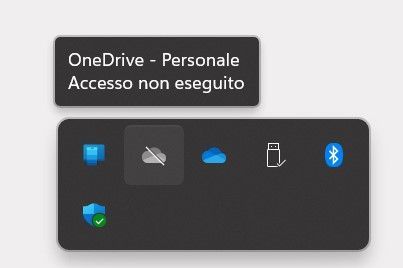

LeonPavesic It didn't work. I removed the reg key, I removed the "Personal" folder in C:\Users\Me\AppData\Local\Microsoft\OneDrive\settings, I disconnected the account (not connected). Restart.
No way.
Other ideas?
Thank you very mutch sorry if i'm short, language poorness 🙂

Hi Pietro1977,
thanks for your Update.
I can give you a few more things to try:
- Uninstall and reinstall OneDrive. This may clear up any corruption that is causing the issue. To uninstall OneDrive, go to Settings > Apps > Apps & features. Find OneDrive in the list and click Uninstall. To reinstall OneDrive, go to the Microsoft Store and search for OneDrive. Click Get to install the app.
- Use the Microsoft Support and Recovery Assistant (SaRA) tool. This tool can scan your computer for and fix common problems. To download and run the SaRA tool, go to the Microsoft support website and search for SaRA. Click Download tool and run the tool.
- Contact Microsoft support. If you have tried all of the above steps and you are still having the issue, you can contact Microsoft support for further assistance.
Here are some additional tips:
- Make sure that you are running the latest version of Windows 11.
- Make sure that you have all of the latest updates installed for OneDrive.
- Try running OneDrive as an administrator.
- Try disabling all other startup programs to see if that resolves the issue.
Please click Mark as Best Response & Like if my post helped you to solve your issue.
This will help others to find the correct solution easily. It also closes the item.
If the post was useful in other ways, please consider giving it Like.
Kindest regards,
Leon Pavesic
- Pietro1977Sep 26, 2023Tin Contributornothing works 😞
- LeonPavesicSep 26, 2023Silver Contributor
Hi Pietro1977,
thanks fot the update.I'm really sorry to hear that none of the solutions have worked for you. I would recommend that you contact Microsoft support for further assistance.
Here are a few things you can mention to Microsoft support when you contact them:
- You have tried all of the troubleshooting steps listed above.
- OneDrive is not working at all, or it is only working partially.
- You are running the latest version of Windows 11 and OneDrive.
- You have all of the latest updates installed for Windows 11 and OneDrive.
- You have tried running OneDrive as an administrator.
- You have tried disabling all other startup programs.
Microsoft support may be able to help you troubleshoot the issue further.
Please click Mark as Best Response & Like if my post helped you to solve your issue.
This will help others to find the correct solution easily. It also closes the item.If the post was useful in other ways, please consider giving it Like.
Kindest regards,
Leon Pavesic
- Pietro1977Sep 29, 2023Tin Contributor
LeonPavesic I think it was due to the fact that my windows user was an online microsoft user and not a local user. So Windows took it for granted that I also wanted to log in with that account, while I was only interested in logging in with the company account. I solved it by creating a local user.