Forum Discussion

Can I connect to a Team Websites Documents folder directly?
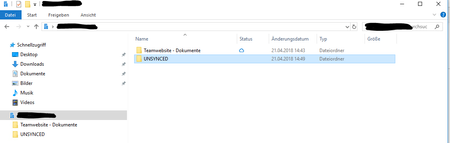

Hi Jos,
thanks for your answer, but that is how I synced it in the first place. Clicking on the "sync" button in the "Documents" folder adds it to the Windows Explorer exactly how you see it in the screen shot.
Maybe you could add two screenshots to show me exactly where to click and how it looks like afterwards?
Daniel

Or just refer to the KB :) https://support.office.com/en-us/article/sync-sharepoint-files-with-the-new-onedrive-sync-client-6de9ede8-5b6e-4503-80b2-6190f3354a88
The screenshots there are exactly how it shows for me, re-reading your question though, I must apologize, I thought you wanted that level, but you want to actually put the link to the library directly at the root level.
That isn't possible through this method, you'd have to make that link manually as a link or symbolic link, probably easiest to add it to Quick access by script.