Forum Discussion

Wish To Remove guest account from MS teams desktop App
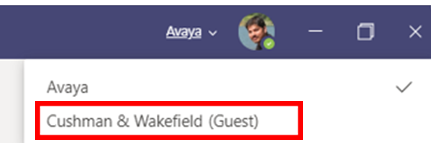

That didn't help. It's not clear. I only log into Microsoft with 1 account, and that account is signed in through SSO. The organisations to which I had guest membership added me with that same account.
Your directions:
1. Go to https://myaccount.microsoft.com/organizations -> Defaults to my 1 account username
2. Sign in with your account that have Guest account added (If not already signed in) -> brings me to my SSO sign in and my own tenant.
3. You should see the option to Leave Organization instead of Sign in to leave organization. -> Nope.
 chiefMouserDec 16, 2021Copper Contributor
I also have this problem. I have a guest login to my wife's previous workplace that we used once to discuss dinner plans before leaving work. Now I can not login to the account or remove myself from the organization (since I am not in it!). However, it still shows up in teams. How do I remove it / hide it / reject an invitation?
 Simon_439Dec 29, 2021Copper ContributorHas this ever been progressed? This is a real nuisance and problem, and I need to remove old/temporary organisations. Can we get a resolution please Microsoft?
- Dec 29, 2021Some work has been done, but it might be not what you are waiting for: https://office365itpros.com/2021/12/15/manage-guest-accounts-from-microsoft-teams/
