Forum Discussion

kpsingh
Jul 09, 2020Copper Contributor
Why Teams desktop client does not auto-login using ADFS?
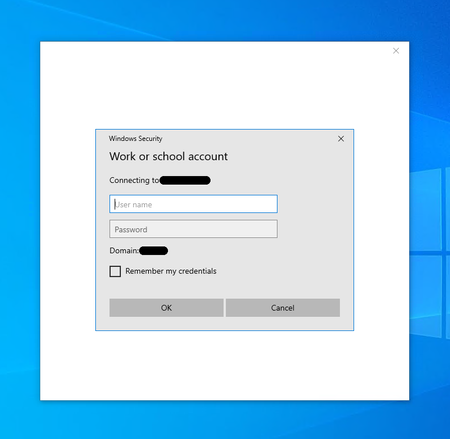
On a domain bound machine, while opening MS Teams it does not auto-login user and shows following prompt: Tried to SSO to MS Excel and it worked on same machine and did not prompt for cred...
 Jul 17, 2020Btw, maybe worth looking at https://docs.microsoft.com/en-us/office365/troubleshoot/sign-in/sign-in-issue-with-modern-auth

kpsingh
Jul 13, 2020Copper Contributor
ChristianBergstrom Please see below for our configuration:
- We are using AD FS on prem and integrated it with O365 for SSO
- Client machines are domain bound which means they login to computer using their AD credentials
- Every Teams URL is added in trusted sites in IE (https://docs.microsoft.com/en-us/microsoftteams/troubleshoot/teams-sign-in/sign-in-loop)
- In IE, User Authentication > Logon is set to "Automatic logon with current user name and password"
Using above configuration, when basic authentication prompt shows up, it should automatically login to teams rather than user to enter credentials again.
This however works with other MS Office apps such as Excel.
I hope this helps more in understanding our issue.
ChristianBergstrom
Jul 14, 2020Silver Contributor
Hey! Sorry for the late reply (on vacation). How does the Outlook desktop clients behave when it comes to SSO?
- kpsinghJul 16, 2020Copper Contributor
ChristianBergstrom Hi, I tried with Outlook and it also seamless SSO. User don't have to enter password with Outlook as well.
- ChristianBergstromJul 17, 2020Silver ContributorBtw, maybe worth looking at https://docs.microsoft.com/en-us/office365/troubleshoot/sign-in/sign-in-issue-with-modern-auth
- ChristianBergstromJul 17, 2020Silver ContributorHello, this seems odd. Does the prompt for Teams pop up every time you start Teams?
”Once you complete the sign in process using modern authentication, you won’t be required to provide your credentials again - from that point on, Microsoft Teams will automatically sign in to your account once you launch the app from the same machine.”
I am afraid I can’t assist properly as I’m on vacation. Perhaps you’d better off opening a ticket with the official MS support.