Forum Discussion

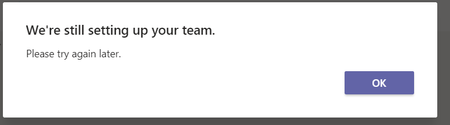
We're still setting up your team. Please try again later.
 Feb 15, 2022My fix was literally to just a folder to the files section of the affected Teams Channel. The Team had been provisioned a week ago, yet no email.
Use the Files tab at the top, and click the "+New" drop down, and create a folder , name does not matter.

Hello TonyTony According to a similar post on our answers.microsoft.com site,
If you just set up your Teams, there's a propagation delay of 24 hours. You can try it again afterwards.
If it does not work, you can contact Office365 Support directly for provisioning issue. You can go to Office.com > Need help widget on the bottom right side. They can run provisioning scripts to provision the account.
Here's the link to the item I quoted above. https://answers.microsoft.com/en-us/msteams/forum/all/error-we-are-still-setting-up-your-team/454036e5-d6a2-4f16-b495-bae2a7717797

None of the other responses in this thread worked for me:
- Waited a week after creation
- Logged out and back in again (both Teams and my computer)
- Tried the web client
- Deleted and Restored the channel
What I found worked was to post a Conversation in the affected channel with an attachment. I had posted in the channel previously, but not with attachments. When I first tried to add attachments, the attachment dialog said that it needed to be set up. A few seconds later, I tried again and it worked to add attachments. After that, everything else worked, including getting the email address for the channel and posting emails to the channel (which is where I first got the "still setting up" error.
It's possible that just triggering some back-end process by trying to add an attachment may have done the trick, but I didn't confirm that.
- MontyPyspockDec 15, 2025Brass Contributor
I think my reply above is pretty much the same as James_D303's, but his is more direct. By posting a Conversation with an attachment, my suggestion had the side-effect of adding a folder and file to the team, which is what triggered whatever mechanism kickstarts the rest of the setup process. By just adding an empty folder, James_D303's solution triggers it more directly.
 Jesper_JohagDec 15, 2025Brass Contributor
Four years later and this trick worked splendid to fix an issue where the files didn't show in any Teams standard channel in a Team. Thanks. 🙂
 --AndyJul 26, 2022Tin ContributorThanks, this helped immediately! What a privy thing to do when you just want to set up a channel and use all common features....