Forum Discussion

SamJacobs
Sep 26, 2019Copper Contributor
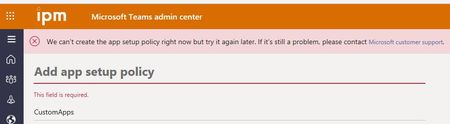
We can't create the app setup policy right now but try it again later.
I'm trying to test out a sample bot, and want to sideload the app, so I'm trying to create an app setup policy that will allow the upload of custom apps. When I try to save the policy, I receive the ...

Matthew Carter
Apr 07, 2021Iron Contributor
We can't save the app permission policy right now. Please try again. If you continue to have problems, contact Microsoft Support
I am getting this error at this location - https://admin.teams.microsoft.com/policies/app-permission/edit/R2xvYmFs
Did you ever get an answer from Microsoft?
I am trying to allow Custom Apps as "I" have to make the Viva Connections app instead of Microsoft doing it! How frustrating.
I am getting this error at this location - https://admin.teams.microsoft.com/policies/app-permission/edit/R2xvYmFs
Did you ever get an answer from Microsoft?
I am trying to allow Custom Apps as "I" have to make the Viva Connections app instead of Microsoft doing it! How frustrating.

StefanHefele
Apr 19, 2021Copper Contributor
Exact same issue here. I followed the steps at
Uploading the App works, but saving (any) App setup policy does not.
I looked up the error by using F12, error messages range from "Invalid App ID" (HTTP error 400, received several times), to "Invalid input parameters 'identity' is a required property", to simply "Bad request"....
Very strange.
 DUTCSmithApr 24, 2021Copper Contributor
StefanHefele I have the same, did it ever resolve for you? over 24 hours now of receiving this message
- StefanHefeleApr 24, 2021Copper Contributor
DUTCSmith, no, I gave up, as I was only preparing a short demo for a customer. I just added the app with my demo user (upload worked, just not the pinning) and pinned it to the top with that same user.