Forum Discussion

ayenco
Dec 21, 2021Brass Contributor
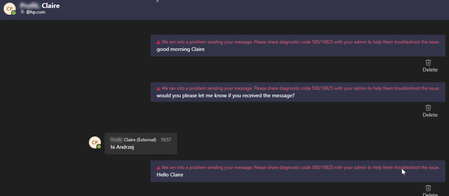
Teams Diagnostic code 500/16825
Teams Diagnostic Code 500/16825 error message when trying to contact external user from Teams. I need help please.

TomArbuthnot
Feb 11, 2022MVP
David,
Some questions to try to help
1. Can you contact other users via federation - i.e. is this the only user you can't chat to
2. Can the other user talk to people other than you via federation?
Trying to narrow down where the issue might be. Tenant admins can block users from using federated chat or it might be another issue
If you want to share the contact details on DM I can see if I can federate to them or to you
thanks
Some questions to try to help
1. Can you contact other users via federation - i.e. is this the only user you can't chat to
2. Can the other user talk to people other than you via federation?
Trying to narrow down where the issue might be. Tenant admins can block users from using federated chat or it might be another issue
If you want to share the contact details on DM I can see if I can federate to them or to you
thanks

David910
Feb 11, 2022Copper Contributor
TomArbuthnot
1. Unfortunately its of all users in that federation. They are all Skype users. In my admin center we have activated the "Allow users in my organization to communicate with Skype users." option.
2. Yes similar to the screenshot above the external users can even contact me, but I cannot answer.
With other external users / service providers we don't have any issues. I will DM my contacts with you for federation check.
- TomArbuthnotFeb 11, 2022MVPWe narrowed the issue down to the remote end/SfBS end issue
 Bazza001982Mar 07, 2022Copper Contributor
Did you ever get a fix or an root cause for this please as i am experiencing the same issues between SFB2015 and Teams TomArbuthnot
 UCworldMar 07, 2022Copper ContributorIn our case, we believe it was some type of deep packet inspection running on a firewall but we don't have exact proof since the customer decided not to troubleshoot this any further. From sfb CLS logs and wire shark on edge servers we saw the following:
In a bad example (with Diagnostic code 500/16825) we are not getting "ACK" message from Microsoft 365. Comparing it to a good IM example, we do get "ACK" message but there is still a 14 second delay sometimes.
This makes us think there is possible packet inspection going on on firewall side but we didn't have access to firewall to check that.
- UCworldFeb 15, 2022Copper ContributorWe are having same/similar issue with a customer we are deploying Teams for. If you have any details to share, will be much appreciated.
Customer is moving from onprem sfb to Teams. Sometimes users trying to IM between onprem sfb and teams user, getting the same error/behavior- TomArbuthnotFeb 15, 2022MVPIf you are mid migration and or a Teams admin you could raise a ticket with MSFT re the issue
Do you own both the teams config and the SfBS config?
If the end state is to get to 100% teams in a reasonable time it might be worth living with the pain, but if you are saying Teams/SfBS for a while worth trying to hunt down the issue