Forum Discussion

Switching Between Main & Guest Account in Desktop App
- Jul 29, 2020Sign out of the desktop client and sign back in and see if this gets you the org switch


DThau In our case it just started working 48h after joining the second Company, no need to clear anything.
however, only the main org is able to send notifications via desktop notifications, so we currently need to check the second org manually to keep up to date.

So... I think I figured out a way to get this working. I tried clearing out the Teams %APPDATA% folder per above and that didn't work for me.
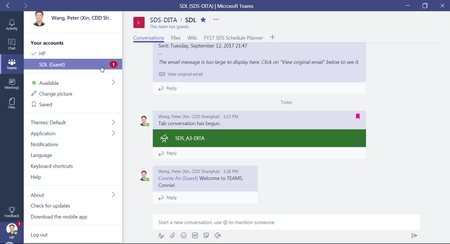
However, then I logged out of Teams Desktop and Quit Teams Desktop app completely. Then I opened the team to which I am a guest in my browser and selected "Get Link to Team" in the team context menu:
Then I closed that browser tab and pasted the link into a new browser tab, and allowed it to open the team MS Teams Desktop App. Now - I can finally see both my main account and the guest account in MS Teams Desktop, just like in the browser:
Tony
 RonHarperMar 17, 2023Copper Contributor
TonySileo OK, I am seeing the exact behavior as the previous user - I have to get the web link from the web page and open it via a new browser tab to see both of the organizations where I have an account. Am I right in assuming that after 48 hours or so this will clear up, or is there some configuration item I might have missed? I do agree that the difference between the two applications is a little concerning.
Ron Harper