Forum Discussion

Switching Between Main & Guest Account in Desktop App
- Jul 29, 2020Sign out of the desktop client and sign back in and see if this gets you the org switch


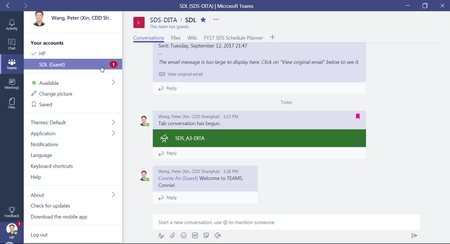
Hi adam deltinger , I have exactly the same issue as rudiminty but I cannot solve it by just signing out and then back in. I received a link from a partner to participate as guest to their team. However, I cannot switch to this guest account on the desktop or the web app. The account selector is not visible.
When I click the link they sent me, it opens the team only if I select "Use the web app instead" and not if I click "Launch it now" to do it through the desktop app.
On the web app I can access the team, and the account selector is visible. However, when I choose to switch back to my main account, the selector is not visible anymore, exactly as it is in the desktop app. Similarly, on the web app, I cannot switch to the guest account If I am logged in my main account.
Any help or ideas would be greatly appreciated!

You can click on your account top right (showing your status) and select "<- -> Accounts & Orgs" and you should be able to switch (hopefully).
- chrichrMar 08, 2021Copper Contributor
Thank you for your response Michael_S11 . Unfortunately it didn't work. I signed out from all my Microsoft account tabs and apps (email, calendar, Teams) and restarted my computer. After the reboot, I opened Teams but I still see the same as before.
Do I miss something?
 MattWoodBristolOct 15, 2021Copper Contributor
chrichr exactly the same issue. I can switch on the web and on my phone but the desktop app doesn't allow it and the "launch it now" for desktop teams does nothing. Is it too much to ask that the experience is consistent across platforms (perhaps especially for the Windows desktop app!!).
 Peggy LangFeb 08, 2022Brass ContributorI have run into the same issue. My external guest is unable to see her company Teams site AND our company Teams site in the Desktop App. She is able to see it from web based.
Conversely, I am a member of 2 external Teams sites and I can see them both from my Desktop App. Is there a 'switch' that needs to be enabled by her IT department? Could it be as simple as that?