Forum Discussion

Spell check settings broken
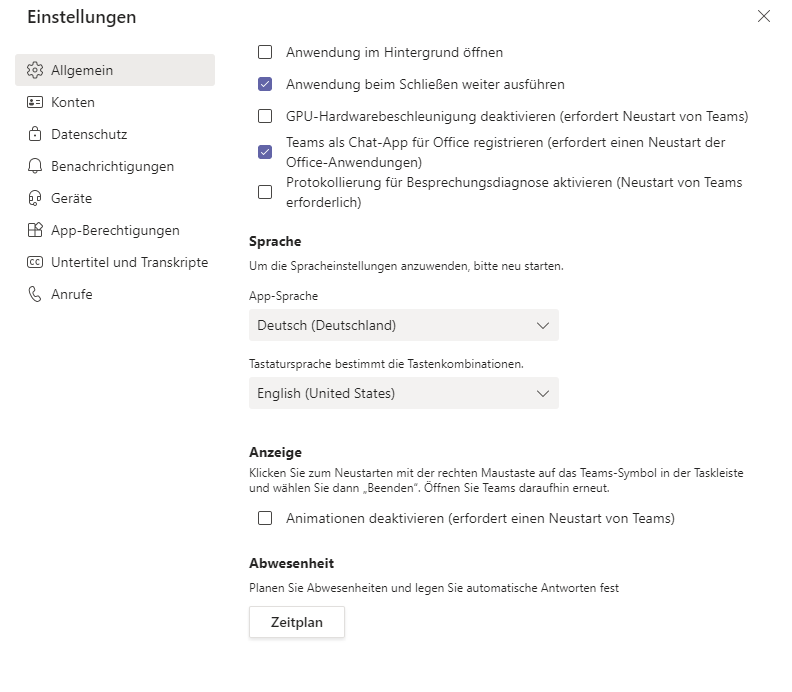
I have disabled spell check in Teams. Since a couple of days it seems to be activated, even if it's disabled in Teams settings. See screenshot "oldcache.png". After clearing Teams cache there's no option anymore to disable spell check ("newcache.pngs")? Teams version is 1.4.00.16575 (last updated July 1 2021)
4 Replies
 THaha2050Copper ContributorSame problem,
I untick the box and then restart the teams (on web browser) but this tickbox never gets unticked. This is September 2023, it should be fixed by now after two years but it seems that it isn't. Mustermann1981Tin Contributor
The issue reproduceable:
- Uninstall Teams
- Install Teams version 1.4.00.11161
- Spell checks can be disabled in settings
- Initiate auto update
- Getting version 1.4.00.16575
- Spell check activated but still disabled in settings
- Delete cache (%appdata%\Microsoft\Teams)
- Spell check setting is gone
- jannek_AaltoCopper ContributorIt's even worse than before - spell checking cannot be disabled by fixing settings.json manually (or via a script), relevant spellcheckDisabled settings are set false at application start and spell checking is forcefully enabled. Very annoying.
 SSSitkaCopper Contributor
jannek_Aalto I feel like I'm having the opposite problem that I want auto spell check and it shows that it is on, but it's not actually working on in my email. Was there a recent update? I'm a terrible speller, and I feel like I'm in going in blind into my emails lol