Forum Discussion

Share window in teams live event: cannot scroll down - not all windows are visible
 Jan 31, 2021
StevenC365 I think I may have found the answer. On my laptop, the standard (and advised) setting is 125%. But this influences the Teams experience so that I cannot properly use the 'share window' selection area to scroll down. So I don't have to change the zoom in Microsoft Teams, but set my laptop screen in general to 100%. If i do that, i works fine. 🙂
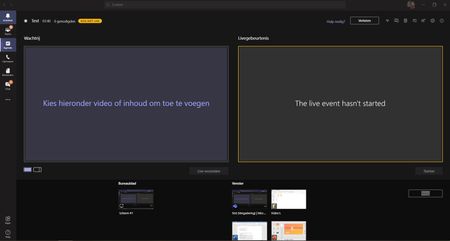
My problem is that when I want to share a window (if there are many windows open) Teams does show all windows that I can share, but I cannot scroll down in that list to pick the right one. So I can see for example 2 windows but there are more windows avaliable but I cannot scroll or move down in the share section. When I zoom out to 85% I can see 4 windows instead of 2, so that proves there are more windows available to share.
My fear is that if I also have a lot of presenters, I will only see a few on my screen and I cannot pick the presenters that are not in the 'first line' of the screen.
I don't know if I have to change the resolution of my laptop or something in Teams or... It just makes me nervous to have a lot of windows (but I can share my desktop) or presenters and not knowing if I will be able to select them in the menu because I can't scroll down in the selection area...

Tom1987 There's a limit of selecting from the 10 presenters/producers who spoke last, but it does become difficult to select people on the second row. I just use the zoom option in Teams to make some more space to select them.
- Tom1987Jan 31, 2021Tin Contributor
StevenC365 I think I may have found the answer. On my laptop, the standard (and advised) setting is 125%. But this influences the Teams experience so that I cannot properly use the 'share window' selection area to scroll down. So I don't have to change the zoom in Microsoft Teams, but set my laptop screen in general to 100%. If i do that, i works fine. 🙂
- Tom1987Jan 31, 2021Tin ContributorBut for instance, when you see my screenshots (and talking about window sharing in this case), if Teams is 100% I only see 2 windows available to share. There is a scroll bar but that doesn't work so I can't go down to pick a third or fourth window. When I zoom to 85% I can see the third and fourth window without scrolling.
My fear is that I cannot scroll down or zoom out sufficiently to pick a presenter (or window, but as you said I can share my desktop) to speak. So it's more like my mouse or keyboard does not let me scroll down to select the right presenter or window.