Forum Discussion

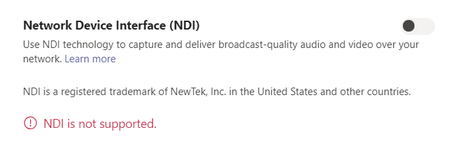
NDI is not supported - error message
 Nov 17, 2020
Thomsch I got mine to work by disabling GPU acceleration in the General settings and then restarting Teams. On my system with an Intel GPU, NDI would be selectable after a reboot but would then turn off with the "NDI is not supported" error as soon as I started a meeting. Interestingly enough, after I disabled GPU and enabled NDI, I was then able to turn GPU acceleration back on and NDI continued to work (at least for now.)
Hopefully this works for other people - we'll see how it goes over the next few events.

I'm in the US and ran into the same issue.... was using NDI perfectly fine within teams and 6 outgoing NDI sources to OBS (on the same computer). Right in the middle of our broadcast Teams just crashed and when it restarted NDI wasn't working. Tried restarting teams a few times, but now i still get the "NDI is not supported". Frustrating to have NDI cut out in the middle of a live event!
Here's my crash report in event viewer:
- <Event xmlns="http://schemas.microsoft.com/win/2004/08/events/event">
- <System>
  <Provider Name="Application Error" />
  <EventID Qualifiers="0">1000</EventID>
  <Level>2</Level>
  <Task>100</Task>
  <Keywords>0x80000000000000</Keywords>
  <TimeCreated SystemTime="2020-11-10T02:25:35.069708500Z" />
  <EventRecordID>62243</EventRecordID>
  <Channel>Application</Channel>
  <Computer>DESKTOP-H6BUI15</Computer>
  <Security />
  </System>
- <EventData>
  <Data>Teams.exe</Data>
  <Data>1.3.0.26064</Data>
  <Data>5f34aa2e</Data>
  <Data>skypert.dll</Data>
  <Data>2020.33.1.1</Data>
  <Data>5f393134</Data>
  <Data>c0010003</Data>
  <Data>0000000000022807</Data>
  <Data>4b68</Data>
  <Data>01d6b6ef1e4444ff</Data>
  <Data>C:\Users\highschool\AppData\Local\Microsoft\Teams\current\Teams.exe</Data>
  <Data>\\?\C:\Users\xxx\AppData\Local\Microsoft\Teams\current\resources\app.asar.unpacked\node_modules\slimcore\bin\skypert.dll</Data>
  <Data>3bc0b966-e7ad-4f83-9fef-6402602dfb6c</Data>
  <Data />
  <Data />
  </EventData>
  </Event>