Forum Discussion

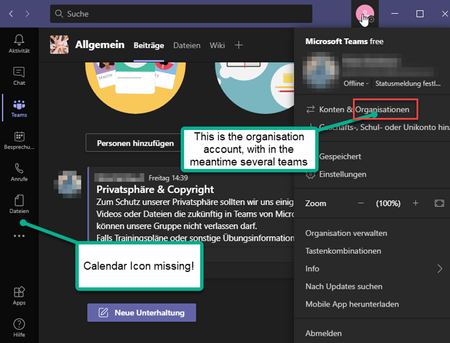
In Teams for Business fehlt der Kalender und die AddIn Integration zu Outlook funktioniert nicht
 Jan 30, 2021
Lösung gefunden. Es war nicht eine Teams for Teams Version, aber eben auch keine Teams for Free Version (das sieht man ja an den Funktionen auf der linken Seite, die es in der Free Version nicht gibt)
Jetzt habe ich mir eine Team for Business Version über Microsoft 365 Business Basic erworben. Den Exchange Server über meine Domain im Admin Center konfiguriert und schon geht es.
Vielen Dank an die Community und den Microsoft Support

pebu67 Hello, not sure I understand you here. But if you're using Teams free the meeting scheduling process is a bit different from when using a "full" Teams that's included with business and enterprise subscriptions (EXO license/mailbox included). When using Teams free the Outlook meeting add-in won't work either I'm afraid.
Try to sign out manually and then back in to Teams (top right corner) to make sure you're signed in properly to your home tenant, not the Teams free org. or any other org where you might be a guest.
This is a good best practice.
- Restart the Teams desktop client.
- Sign out and then sign back in to the Teams desktop client.
- Restart the Outlook desktop client.
- pebu67Jan 27, 2021Brass Contributor
Das habe ich aktuell nochmal alles gemacht. Das Ergebnis ist das gleiche. Wenn ich Microsoft Teams nun starte, startet erst mein Microsoft Teams Free Account, dann muss ich den Account zur Organisation wechseln. In beiden Fällen, funktioniert die Outlook Integration nicht. Normalerweise sollte sie mindestens beim Business Account funktionieren. Oder?
Wie in der Discussion auch noch erwähnt, habe ich in der Desktop Version und in der Web Version von Teams for Business keinen Kalender auf der linken Seite. Das ist echt schade, denn so kann ich nur umständlich - wenn überhaupt - eine geplante Besprechung, die in der Zukunft liegt über Microsoft Teams for Business planen.
Momentan verwende ich ausschließlich die Web Version von Microsoft Team for Business, da es um einiges besser Perfomance aufweist und es zur Desktop Versionen keinen sichtbaren unterschied gibt.
Wer sonst Tipps hat, vielen Dank dafür. Es würde mich freuen.
Beste Grüße Peter
#BleibtGesund- pebu67Jan 30, 2021Brass Contributor
Lösung gefunden. Es war nicht eine Teams for Teams Version, aber eben auch keine Teams for Free Version (das sieht man ja an den Funktionen auf der linken Seite, die es in der Free Version nicht gibt)
Jetzt habe ich mir eine Team for Business Version über Microsoft 365 Business Basic erworben. Den Exchange Server über meine Domain im Admin Center konfiguriert und schon geht es.
Vielen Dank an die Community und den Microsoft Support