Forum Discussion

michaelmaillot_op
Nov 30, 2019Brass Contributor
Delete Teams from Admin Interface not as efficient as from UI
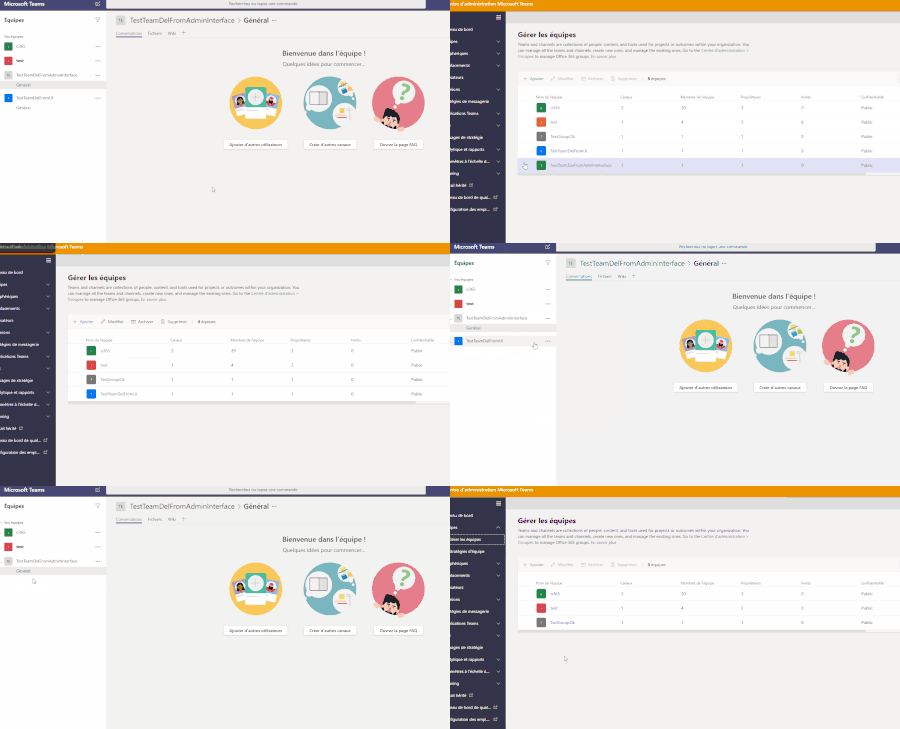
Hi, I just realized that if I delete a Team from admin interface, you can still see it in from user interface. But when deleting Team from user interface, it disappear from both admin and user in...
- Nov 30, 2019Hi ,
Hope you are well. Official documentation doesn’t specify an optimal way, It outlines both the IT admin led way via the TAC
https://docs.microsoft.com/en-us/microsoftteams/archive-or-delete-a-team
And the owner/user led way in the Team
https://support.office.com/en-us/article/delete-a-team-c386f91b-f7e6-400b-aac7-8025f74f8b41
In my experience most in the community typically recommends the user led way as like you said it is perceived to be cleaner
https://techcommunity.microsoft.com/t5/Microsoft-Teams/Delete-Team/m-p/269752
Whilst others recommend Powershell
https://docs.microsoft.com/en-us/powershell/module/teams/remove-team?view=teams-ps
And others the Graph
https://techcommunity.microsoft.com/t5/Teams-Developer/Deleting-a-Team-via-Graph-API/m-p/729152
As you will see from the Graph conversation removing a Team on the back end takes time and the team can hang around. This is how it is designed but the confusion resulting from the persistence is why deleting them in the client is typically recommend over a back end delete. However an IT admin may not have the ability to access that team. So you may want to do back end but a little bit of education is needed. Also the admin needs to define an approach to deletion as in simply delete or archive then delete, also can it be simply deleted due to retention, legal hold etc
The way you are permanently deleting things is typically the way people do it. Team, Group, Site. I also see Group delete then Group hard delete then site. I would also recommend keeping the 30 day soft delete period in just in case recovery is ever needed.
Hope that helps to answer your question! It is largely interpretive and working it out is part of your Teams lifecycle policy!
Best, Chris

Nov 30, 2019
Hi ,
Hope you are well. Official documentation doesn’t specify an optimal way, It outlines both the IT admin led way via the TAC
https://docs.microsoft.com/en-us/microsoftteams/archive-or-delete-a-team
And the owner/user led way in the Team
https://support.office.com/en-us/article/delete-a-team-c386f91b-f7e6-400b-aac7-8025f74f8b41
In my experience most in the community typically recommends the user led way as like you said it is perceived to be cleaner
https://techcommunity.microsoft.com/t5/Microsoft-Teams/Delete-Team/m-p/269752
Whilst others recommend Powershell
https://docs.microsoft.com/en-us/powershell/module/teams/remove-team?view=teams-ps
And others the Graph
https://techcommunity.microsoft.com/t5/Teams-Developer/Deleting-a-Team-via-Graph-API/m-p/729152
As you will see from the Graph conversation removing a Team on the back end takes time and the team can hang around. This is how it is designed but the confusion resulting from the persistence is why deleting them in the client is typically recommend over a back end delete. However an IT admin may not have the ability to access that team. So you may want to do back end but a little bit of education is needed. Also the admin needs to define an approach to deletion as in simply delete or archive then delete, also can it be simply deleted due to retention, legal hold etc
The way you are permanently deleting things is typically the way people do it. Team, Group, Site. I also see Group delete then Group hard delete then site. I would also recommend keeping the 30 day soft delete period in just in case recovery is ever needed.
Hope that helps to answer your question! It is largely interpretive and working it out is part of your Teams lifecycle policy!
Best, Chris
Hope you are well. Official documentation doesn’t specify an optimal way, It outlines both the IT admin led way via the TAC
https://docs.microsoft.com/en-us/microsoftteams/archive-or-delete-a-team
And the owner/user led way in the Team
https://support.office.com/en-us/article/delete-a-team-c386f91b-f7e6-400b-aac7-8025f74f8b41
In my experience most in the community typically recommends the user led way as like you said it is perceived to be cleaner
https://techcommunity.microsoft.com/t5/Microsoft-Teams/Delete-Team/m-p/269752
Whilst others recommend Powershell
https://docs.microsoft.com/en-us/powershell/module/teams/remove-team?view=teams-ps
And others the Graph
https://techcommunity.microsoft.com/t5/Teams-Developer/Deleting-a-Team-via-Graph-API/m-p/729152
As you will see from the Graph conversation removing a Team on the back end takes time and the team can hang around. This is how it is designed but the confusion resulting from the persistence is why deleting them in the client is typically recommend over a back end delete. However an IT admin may not have the ability to access that team. So you may want to do back end but a little bit of education is needed. Also the admin needs to define an approach to deletion as in simply delete or archive then delete, also can it be simply deleted due to retention, legal hold etc
The way you are permanently deleting things is typically the way people do it. Team, Group, Site. I also see Group delete then Group hard delete then site. I would also recommend keeping the 30 day soft delete period in just in case recovery is ever needed.
Hope that helps to answer your question! It is largely interpretive and working it out is part of your Teams lifecycle policy!
Best, Chris