Forum Discussion

guptha1989
Feb 07, 2022Copper Contributor
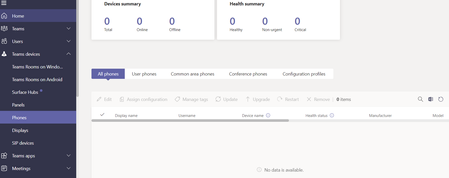
Common area Phones are showing under User Phones in Teams Devices->Phones
In Teams admin Center, Under Teams Devices -> Phones, The Common area phones are listed under User Phones. Need to know how these are categorized.

Feb 08, 2022
Hi,
There is a TeamsIPPhonePolicy currently in place called “CAP”. The SignInMode is set to Common Area Phone. Is this policy assigned to any of the CAP accounts?
Assign the policy and this should fix the issue.
With Regards
Satish U
There is a TeamsIPPhonePolicy currently in place called “CAP”. The SignInMode is set to Common Area Phone. Is this policy assigned to any of the CAP accounts?
Assign the policy and this should fix the issue.
With Regards
Satish U

guptha1989
Feb 09, 2022Copper Contributor
Could you please share the command for setting the CSTeamsipphonepolicy?
- Feb 09, 2022Hi,
Here is the command for your reference
Set-CsTeamsIPPhonePolicy -SignInMode CommonAreaPhoneSignIn
With Regards,
Satish U Gurpreet1615Jun 17, 2024Copper Contributor
RealTime_M365 unable to use speed dials with this sign in mode for users. can you suggest something .users can assign speed dial using teams client, contact shows up as well on speed dial on the desk phone(poly ccx400) but while trying to use it won't make a call. otherwise calls are working fine.
 NicholasD1590Jul 07, 2022Copper Contributor
Hello,
I used this command and all of my phones ended up in the common area phones tab, is there anyway to reverse this or only have one phone under common area phones?
Any help is appreciated.
- Jul 16, 2022Hello,
Kindly use the below command for the same
Set-CsTeamsIPPhonePolicy -SignInMode UserSignIn
With Regards,
Satish