Forum Discussion

Add SharePoint site as a App to the Teams
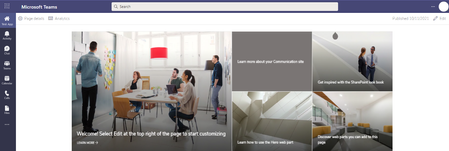

Let me know the outcome.
Kind regards,
Mitchell
 mahendra89Nov 09, 2021Tin ContributorThe Website tab is available within a specific channel in the Teams, but here we need to add the SharePoint site as an Icon available to all user of the Teams app on left Side bar.
- NikkiChapple_Nov 09, 2021Iron Contributor
mahendra89 you can create a custom app to do this. Then then Teams admin can a add the app to the left hand nav bar for all users. here is a quick overview of the steps.
Go to the Developer Portal https://dev.teams.microsoft.com/home
+ New App
- Add details
Add Personal App
- In Content URL paste in the Form URL
Publish App too Your org
In Team Admin center - Managae Apps
- make sure app is approved and allowed
In Team Admin – Set up policies
- Add app to Nav bar for all users
This can take several hours to publish app to the nav bar in Teams.
Go to the Developer Portal https://dev.teams.microsoft.com/home
+ New App
- Add details
Add Personal App
- In Content URL paste in the SharePoint site URL
Publish App to Your org
In Team Admin center - Manage Apps
- make sure app is approved and allowed
In Team Admin – Set up policies
- Add app to Nav bar for all users
This can take several hours to publish app to the nav bar in Teams.
 HannibopeepApr 27, 2026Copper Contributor
This worked great for me and I added the "?app=portals" to the primary content URL (which is a Hub site in my case) so the navigation would appear. The problem I'm now having is that anything clicked from the Hub-level navigation is opening in the browser and I want it to stay in Teams. I've tried adding "?web=1", "?app=portals" and ".aspx "to the end of each link in the Hub navigation attempting to keep the experience contained to the app. Any insights or ideas?
