Forum Discussion

Vernster
Sep 10, 2022Copper Contributor
Linking a workbook to an incident/analytics rule
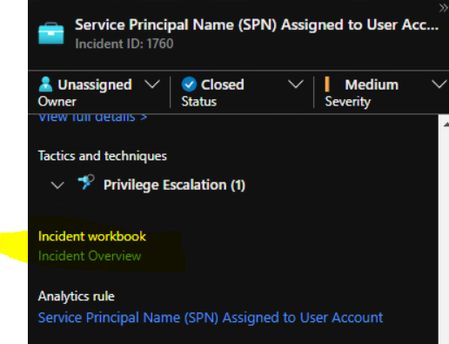
Hi all, I would like to link a custom workbook to an incident raised by an analytics rule. By default the "incident workbook" link is shown on the incident details like this: I would li...
- Sep 11, 2022Correct - the name stays the same, but you can change the entire content, but if you do it will be overwritten if Microsoft make a change (and you accept the update).
You can also link a workbook from a workbook, see https://garybushey.com/2022/05/28/mimic-drilldown-in-a-microsoft-sentinel-workbook-part-ii/
Maybe you can have a control in the Workbook light up when your specific Incident is seen, and it suggests you launch the specific linked workbook, or just to open a specific Tab. Or use "make this item conditionally visible" to show extra data only when the right incident is detected.

Vernster
Sep 11, 2022Copper Contributor
Hi Clive,
Thanks, much appreciated!
Am I correct that this is a global workbook and that it's not possible to change a workbook for a specific incident?
Thanks, much appreciated!
Am I correct that this is a global workbook and that it's not possible to change a workbook for a specific incident?

Clive_Watson
Sep 11, 2022Bronze Contributor
Correct - the name stays the same, but you can change the entire content, but if you do it will be overwritten if Microsoft make a change (and you accept the update).
You can also link a workbook from a workbook, see https://garybushey.com/2022/05/28/mimic-drilldown-in-a-microsoft-sentinel-workbook-part-ii/
Maybe you can have a control in the Workbook light up when your specific Incident is seen, and it suggests you launch the specific linked workbook, or just to open a specific Tab. Or use "make this item conditionally visible" to show extra data only when the right incident is detected.
You can also link a workbook from a workbook, see https://garybushey.com/2022/05/28/mimic-drilldown-in-a-microsoft-sentinel-workbook-part-ii/
Maybe you can have a control in the Workbook light up when your specific Incident is seen, and it suggests you launch the specific linked workbook, or just to open a specific Tab. Or use "make this item conditionally visible" to show extra data only when the right incident is detected.
- VernsterSep 12, 2022Copper ContributorThanks!