Forum Discussion

tommyt
Dec 13, 2018Copper Contributor
Microsoft Forms not connecting to Flow
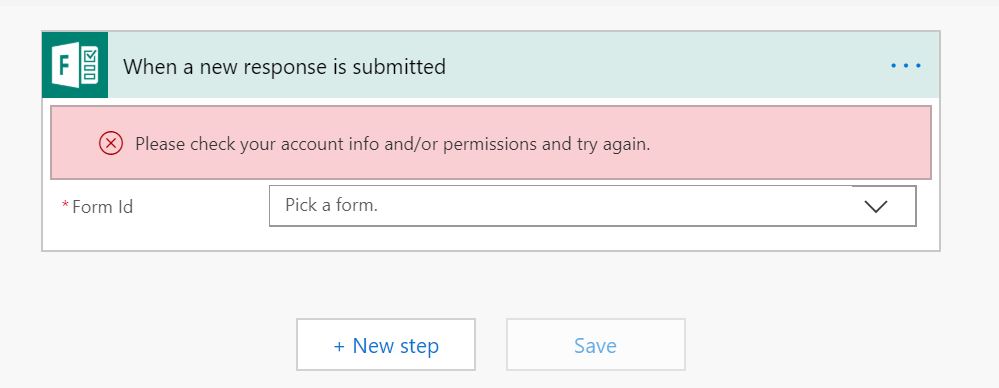
Hi, Really tearing my hair out here - I'm trying to connect Forms to Flow, and each time I get an error message saying to check my permissions/account info - I can't seem to find any solutions a...

Thuyavan Ganesan
Dec 13, 2018Steel Contributor
Go to Flow and please check if you have provided a proper Office 365 account for the action where you are connecting MS Forms, When you open your flow it must be throwing error by now.please check.
Also
You could try to solve the problem from these aspects:
Log in to your account in MS Forms to see if it is valid. If it is invalid, please try to change the account or password.
Or register a new MS Forms account directly, then add a new connection to see if this issue still occurs.
If the account is valid, try adding a new MS Forms-Connection, or delete the previous connection and re-create the new connection.
Please refer this forum too...
https://powerusers.microsoft.com/t5/General-Flow-Discussion/MS-Flow-amp-MS-Forms-Please-check-your-account-info-and-or/td-p/181925
Also
You could try to solve the problem from these aspects:
Log in to your account in MS Forms to see if it is valid. If it is invalid, please try to change the account or password.
Or register a new MS Forms account directly, then add a new connection to see if this issue still occurs.
If the account is valid, try adding a new MS Forms-Connection, or delete the previous connection and re-create the new connection.
Please refer this forum too...
https://powerusers.microsoft.com/t5/General-Flow-Discussion/MS-Flow-amp-MS-Forms-Please-check-your-account-info-and-or/td-p/181925