Forum Discussion

KAKhan1215
Feb 09, 2021Copper Contributor
How we can add Household Roster Type Data collect through Forms?

RobElliott
Feb 09, 2021Silver Contributor
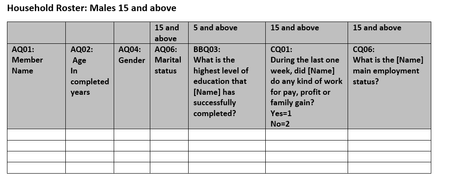
KAKhan1215 I'm not quite sure what you mean by household roster type data. But from your screenshot the form is easy to create as follows:
- Member name: if they are in your organisation you don't need this as Forms will know who they are. But if they are external as well then just add a text question.
- Age: text question with the restriction set to a number.
- Gender: choice question.
- Marital status: choice question.
- Education: choice question
- Work: choice question
- Employment status: choice question. Note here you can't insert the responder's name into the question.
You can then use a flow in Power Automate to save those responses to a SharePoint list.
Rob
Los Gallardos
Microsoft Power Automate Community Super User