Forum Discussion

The "Reference a file" feature not working as documented
- Dec 05, 2023Hi mjudi,
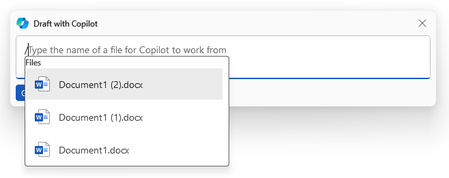
Copilot can only use files which are stored "in scope of the platform". For example SharePoint Online (and OneDrive). Depending on the application from which you start the prompt it will show the last 3 or 10 accessed items.
To use another file you need to paste the full path after the "/".


I do get an option to browse files from the cloud when using Word for the web:
It allows me to search for files in the company's sites.

User2600 Yes, this is as expected, however, I found out that if I'm on a VPN, I get the following error and can't see any files: PrefetchFailure (NoTokenProviderForUnauthenticatedPrefetch)
- User2600Jun 26, 2024Copper Contributor
mjudi, I can use the "Browse files from cloud" option with or without a VPN. You might want to check whether your VPN is using some kind of threat protection, though, because in my experience, when that setting is turned on, I cannot use the Windows Copilot.
 NicholeS1155Sep 07, 2024Copper Contributor
I'm wondering if I'm having a similar VPN problem. I seem to be able to use Copilot fine except for when trying to reference a file on OneDrive. Every time, it says, "Sorry, something went wrong. Try again in a few moments." This is when I select one of the three on the list, when just writing a file name with the extension, and entering the full file path. I've tried absolutely everything recommended here and elsewhere...was this the problem you encountered with it being a VPN issue? I'm not an admin in our IT dept., is there a little more detail as to what setting(s) I can have them check?
- User2600Sep 13, 2024Copper Contributor
Hi NicholeS1155 ,
I had an even worse issue because when the threat protection setting of my VPN was turned on, Copilot wouldn't work at all, whether referencing files or not. You might want to ask them to check if, besides tunneling (which in itself is not the problem), your VPN is using some form of threat protection, such as ad, malware or tracker blockers, etc. In my experience, turning off the protection settings solved the issue, and I can now use Copilot while on the VPN.
Good luck!
- mande1191Jun 26, 2024Bronze Contributor
I forgot to mention that I use a personal license (Copilot Pro).
 AlexODownUnderJun 30, 2024Copper ContributorThis feature is ONLY available to the Enterprise Copilot licenses, not to personal ones.
