Forum Discussion

Disabling Agent Creation for End Users with Copilot for Microsoft 365
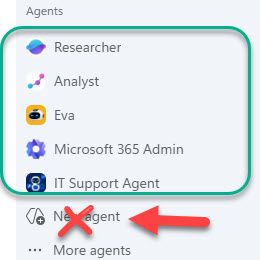

Disabling the Copilot Studio license removes the full maker experience, but Agent Builder is governed separately; therefore New Agent remains visible. In the Microsoft 365 admin center, open Copilot, Settings, Data access, Agents, then scope Agent Builder or Create an agent to an approved builders group. Keep Microsoft and organization-published agents deployed to broader groups through All agents or Integrated apps. Do not set general agent User access to No users, because that also prevents those users from interacting with approved agents. After propagation, sign a test user out and in, then confirm approved agents open while creation is absent. If your tenant exposes only a combined agent-access control and no separate builder scope, the requested split is not currently available in that rollout; open a Microsoft 365 support request rather than relying on license removal.

Hi Jamony, thanks for your answer and I was keen to look at this myself, but unfortunately I can't follow your instructions. In M365 Admin Center, under Copilot > Settings, there is no option for 'Data access'. Could you please confirm what you're referring to?
On the default Optimize tab, there are suggestions relating to 'Data security', but nothing about 'Data access'. Same on the 'View all' tab; there is an option for Agents and in there you can define who can access and share agents, but nothing around setting who can build/approve agents.
 Dr_JohnPCarlinAug 25, 2026Tin Contributor
Hi. I too have the same request and cannot disable this or find Data access. Please help!?!