Forum Discussion

Copilot missing in Word, Excel and PowerPoint desktop apps

gjayne84 when I say I re-enabled the store I mean we had blocked the Microsoft store for employees through intune. I made registry changes to enable it on my machine. I am waiting today to see if another user has word and excel copilot without making the same changes - I suspect it’s a timing issue and may take 24 hours to filter through.
Excel is greyed out on mine too - I think that’s normal. You need to create a table (format as table) and then after “thinking” a little bit it un-greys. I found it isn’t greyed out as long when I open an older doc that hat was already saved in teams/ OneDrive / sharepoint.
thanks!

 Erik_AvegaartFeb 02, 2024Copper Contributor
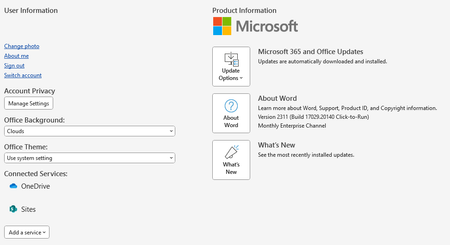
gjayne84 What I did was [Update License] under account,. After restart Copilot was there
 Erlend_OianJun 03, 2024Copper Contributor
Erik_Avegaart "Update License" results in "Error Code: 44", additional M365 accounts removed, but "Error Code: 44" persists. Interesting to hear if other faces this too.
- mcollis84Feb 02, 2024Copper Contributor
Erik_Avegaart I don’t think this update button is there on the enterprise monthly channel. It worked on mine and another system after about 24 hours.
- Erik_AvegaartFeb 02, 2024Copper ContributorI am now on Enterprise monthly, but i used to be on current in the past, maybe that explains why I have the button