Forum Discussion

Mike Tilson
Dec 18, 2017Iron Contributor
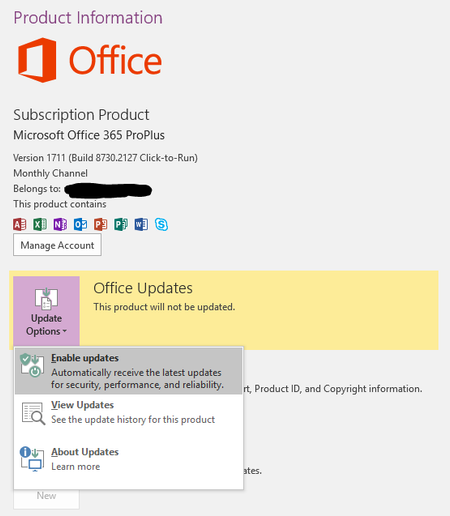
Office C2R Version 1711 8730.2127 - This product will not be updated.
Anyone else lose the ability to update Office after receiving Version 1711 8730.2127? I had a colleague who couldn't reproduce the error with previous Office bits then he updated to Version 1711...

Deleted
Jan 03, 2018Not applicable
Yes we have the same issue if we updated on the 1st Dec (we do a manual update each month or twice a month) so for some of us it appeared for the previous version number - something in this upgrade changed the command:
OfficeC2RClient.exe now has a parameter /ChangeSetting updatesEnabled= False 16:
Would love to know how to change all these P.C.'s to be able to update again (even system admin doesn't have authority to enable)

manoth_msft Microsoft
Jan 12, 2018MicrosoftI would check if one of or both regkeys are set:HKLM\software\policies\microsoft\office\16.0\common\officeupdate!enableautomaticupdates = 0HKLM\SOFTWARE\Microsoft\Office\ClickToRun\Configuration\UpdatesEnabled = False
If it is the case, close the Office applications, change the keys to 1/True and retest. If the issue is gone now and update is enabled, you must identify why these keys are set to 0/False. The first regkeys is controlled by Group Policies, the second is normally set during the setup or the user interface.
 Mike TilsonJan 12, 2018Iron Contributor
Both of those keys are set correctly for me...1/True and I still have the update issue.