Forum Discussion

New Entra ID group device criteria scoping is missing from Cloud Update
- Jul 30, 2026
Send me a DM and we can take a look.
Also, we recently launched our own space on Tech Community for the Microsoft 365 Apps admin center: Microsoft 365 Apps admin center | Microsoft Community Hub


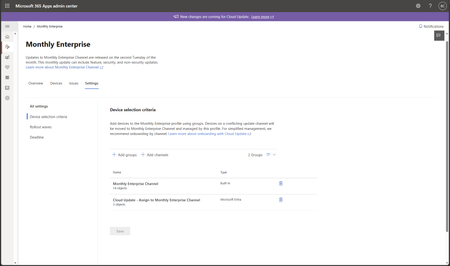
The screenshot suggests that the new experience has already reached this tenant. Device selection criteria is the new profile-level assignment page, and + Add groups is where Microsoft Entra groups are added. The row showing Cloud Update - Assign to Monthly Enterprise Channel with the type Microsoft Entra confirms that an Entra group is already assigned to the Monthly Enterprise profile. There is not a separate Entra ID criteria switch or another page to enable after that.
To add another scope, use + Add groups and select the Entra group containing the required users or devices. Cloud Update then uses that assignment to bring eligible devices under the profile and, where necessary, move them to the profile’s update channel. Allow some time for group membership and device inventory to be evaluated after making a change.
The Message Center date should be treated as the expected completion window, not a tenant-by-tenant activation date. Microsoft’s documentation still notes that the new profile assignment experience rolls out gradually, so there is no public way to force or predict the exact time for a particular tenant. In this case, though, the UI shown in the screenshot is the feature described in the announcement.
These two Microsoft guides describe the Device selection criteria and Add groups experience shown in your screenshot:
New changes coming to cloud update - Microsoft 365 Apps | Microsoft Learn
Configure profile and channel assignment - Microsoft 365 Apps | Microsoft Learn