Forum Discussion

Error when applying Sensitive Labels with Encryption
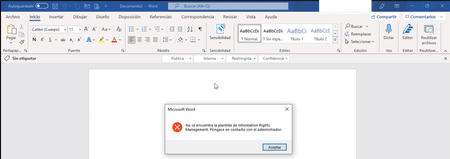

iamarnoldmcse Hi, I just recently got the above message and it's simply the propagation time. At least it was for me. I bet it works now as your post has been here for a while?

Hi ChristianJBergstrom, tks for your response.
Indeed in my Demo Tenant, I am able to apply Sensitive Labels with encryption, as you said it seems it was a matter of "a lot of time for propagation", but on the production tenant we are still getting the same error and the tenant was configured with templates about 15 days ago.
From the PC:
1- The Internet has no restrictions.
2- We have tried with the three client versions: https://www.microsoft.com/en-us/download/details.aspx?id=53018
3- We have tried with users with and without local admin permissions.
4- We have cleaned up the Client folders to reset client config
4- We have tried with different PCs and Users
From the Tenant (MIP Config):
1- Sensitivity Labels are configured with the correct permissions (Including users for testing)
2- Label Policies correctly configured for end-user visibility
3- More than 10 days for label propagation.
Any other idea is really appreciated!
 Daught889Jan 06, 2022Copper ContributorHello iamarnoldmcse
I had the same problem. For me it was the Protection Template which holds the status 'Archived' and never gets 'Published', when Encryption was applied to a new created Label. So with status 'Archived' the Information Protection Template is never stored on the client.
A possible workaround for me was, setting the AIPServiceTemplate manually to published, using the following script.
------------------------------------------------------
Set-ExecutionPolicy Bypass
Install-Module AIPService
Import-Module AIPService
Connect-AIPService
Get-AipServiceTemplate | FL
Get-AipServiceTemplateProperty -TemplateId <xxxxxxxx> -Status <--- this reports the custom label is at "Archived" state by default, why??
To fix it:-
Set-AipServiceTemplateProperty -TemplateId <xxxxxx> -Status Published
------------------------------------------------------
Don't forget to reset settings in the ULC, so templates can be fetched again.- Jan 06, 2022Hi, must ask if you haven't migrated your AIP labels yet?
https://docs.microsoft.com/en-us/azure/information-protection/configure-policy-migrate-labels- iamarnoldmcseJan 06, 2022Copper Contributor
Hi ChristianJBergstrom ,
So after 11 days since sensitivity labels were created...end-users communicate they are now able to apply all the labels including the ones that apply encryption. It is kind of concerning the time it takes to propagate the labels within the tenant.
I also had to open a support case with Microsoft, I have not received a response yet but in the meantime and after a lot of waiting (11 days) finally, labels are available. Other configurations like Coauthoring and enabling labels for Teams, Sharepoint, and M365 Groups also take a lot of time.
Hopefully, Microsoft improves the time it takes to speed up all of these configurations.
Have a good one all of you. I will post again if another roadblock is found.
- Jan 03, 2022
iamarnoldmcse Hello again, I would probably just compare the demo tenant settings with the production tenant settings to narrow it down as what's causing the issue. I suppose you've already done that. Have you also verified the distributionstatus, priority (and all other settings) using PowerShell?
Get-Label (ExchangePowerShell) | Microsoft Docs
Get-LabelPolicy (ExchangePowerShell) | Microsoft Docs
Other than that I would look at this too if you want to use built-in labeling?
Office built-in labeling client and the Azure Information Protection client
Difficult to help here really, you're probably better off creating a ticket with the official support having them look at some more details and logs.